

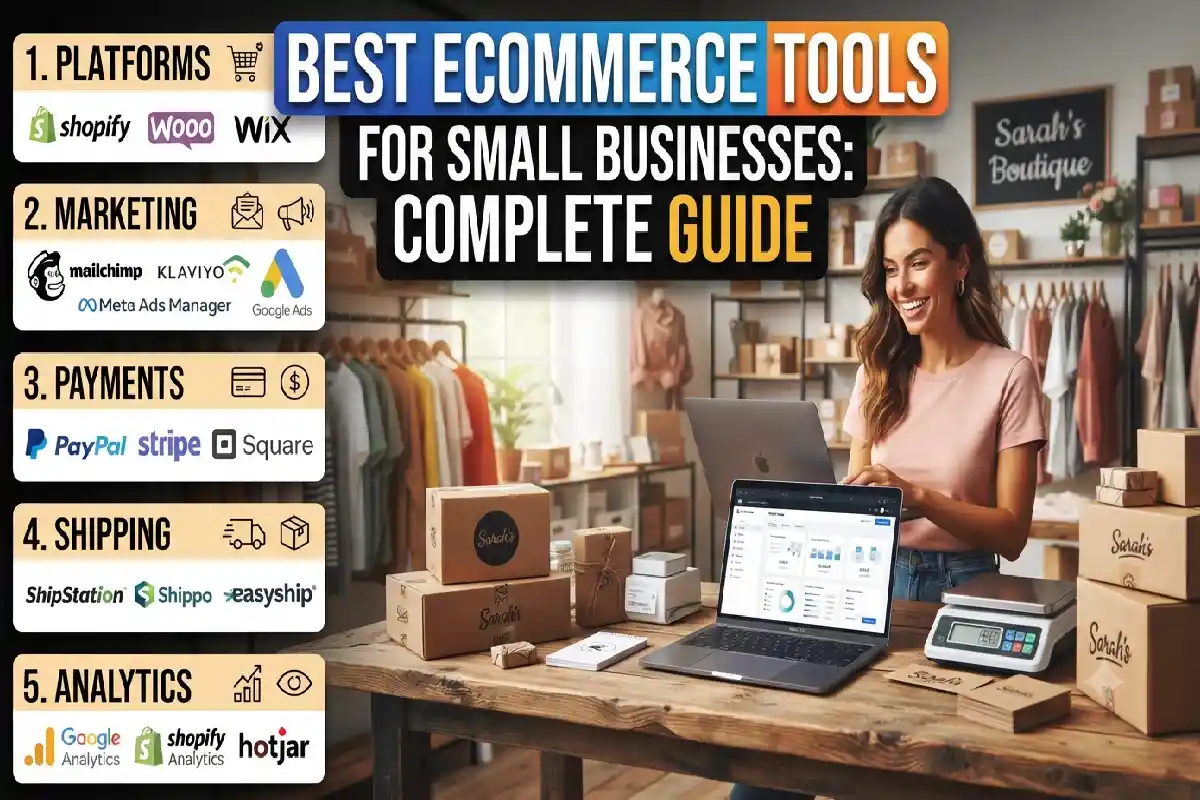
Best Ecommerce Tools for Small Businesses: Complete Guide
Last Updated: September 21, 2026
Having an ecommerce is about much more than upload the products online. Small businesses need technology that helps manage product, process payments, order tracking, marketing, create reports and help customer service. Good ecommerce technology can translate into repetitive work saving, better customer experiences and empowering a small team to do more.
Buying every tool under the sun can be pricey and overwhelming. The intention is not to have the world‘s most extensive technology set, but rather to put together a manageable collection of a few tools that is able to address the most critical business challenges.
I will also share the best ecommerce tools for small businesses, tell you what tools you actually need, show you how to run your online shop efficiently, help you find the right marketing & automation tools so your business can grow, and teach you how to pick your software without breaking the bank.
What Ecommerce Tools Does a Small Business Need?
The foundation of your online business is your ecommerce site. It is the tool that lets you create a page, manage your customers, ship your order and operate the storefront.
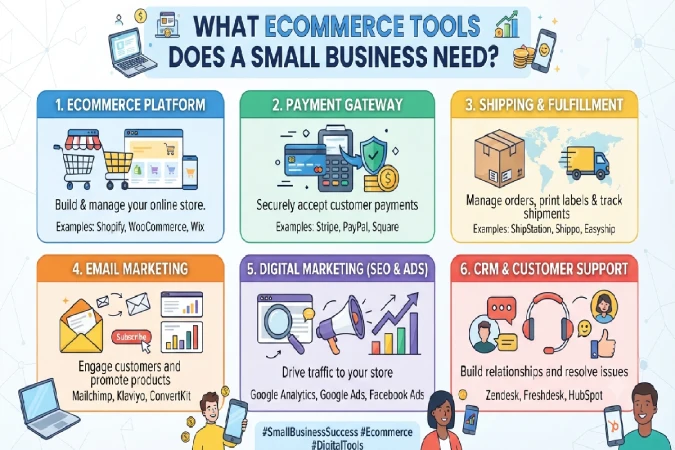
A typical small ecommerce business may need tools for:
- Ecommerce store management
- Product and inventory management
- Order management
- Payment processing
- Shipping and fulfillment
- Marketing
- Email and SMS automation
- Search engine optimization
- Analytics
- Customer service
- Accounting
- Security
- Productivity and collaboration
No need to use your separate application for each and every category.
For instance, if your ecommerce website already has product management, payment integration, order management, some basic analytics and customer accounts, only then would providing more specialized software make sense.
1. Ecommerce Platform
Your ecommerce platform is the most important component of your online business. It enables you to generate product pages, organize customers, fulfill orders and run your storefront.
Common choices are Shopify, WooCommerce, BigCommerce, hosteds and self hosted.
When evaluating an ecommerce platform, consider:
- Monthly cost
- Transaction fees
- Payment options
- Available integrations
- Themes and customization
- Inventory features
- SEO capabilities
- Mobile experience
- Scalability
- Technical requirements
Prioritize simplicity and reliability over costly extras when starting out.
2. Payment Processing
The customers have to be provided with an easy mode of paying for the products.
Depending on your target market, you might offer:
- Credit and debit cards
- Digital wallets
- Bank transfers
- UPI
- Buy Now Pay Later
- Cash on delivery
- Other regional payment methods
The more payment processors you compare, the better deal you should get. Payment processors will charge (per transaction and/or processing fee). Therefore, do not just look at monthly subscription prices, compare sum of all costs.
3. Inventory Management
Inventory software helps you know:
- What products are available
- How many units remain
- Which products are selling quickly
- When stock needs replenishment
- Which products are out of stock
- Inventory value
If you run just a handful of products, your ecommerce system could be all you need. However, as you add more products to the catalog, warehouses and suppliers, your inventory system becomes even more important.
4. Shipping and Fulfillment
Shipping tools can automate:
- Shipping-rate calculations
- Shipping labels
- Tracking numbers
- Carrier selection
- Order notifications
- Returns
- Delivery management
For small businesses, integrating shipping software with the store can eliminate substantial manual work.
5. Marketing Tools
Marketing tools help attract visitors and turn them into customers.
Common categories include:
- Email marketing
- SMS marketing
- Social media management
- SEO tools
- Advertising platforms
- Content marketing
- Affiliate marketing
- Referral programs
You don’t need all of these from day one.
6. Analytics
Analytics tools help answer questions such as:
- Where are customers coming from?
- Which products sell the most?
- How many visitors become customers?
- What is the average order value?
- Which marketing campaigns generate sales?
- Where do customers abandon the buying process?
Without analytics, businesses often make decisions based on assumptions.
7. Customer Service
Customer-service tools can centralize:
- Email inquiries
- Live chat
- Contact forms
- Order questions
- Returns
- Refund requests
- Frequently asked questions
As order volume increases, a helpdesk can become much more efficient than managing customer conversations through a shared inbox.
Best Tools for Managing an Ecommerce Store
Store-management tools form the operational core of your business.
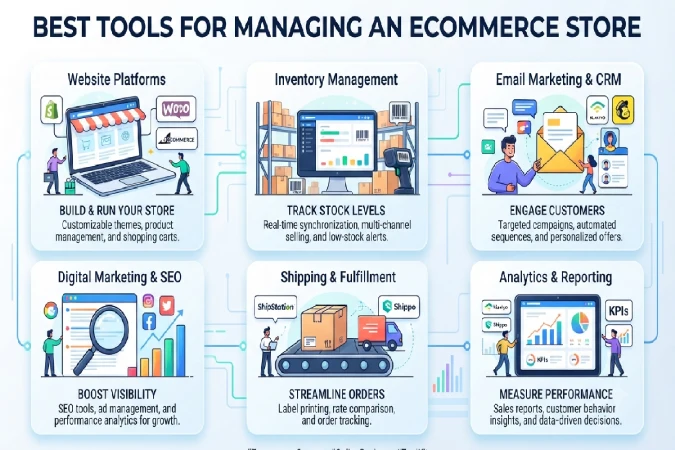
Shopify
Shopify is a hosted ecommerce platform that enables merchants to set up and run their own online stores without the necessity of hosting their servers.
Its ecosystem includes:
- Storefront management
- Product catalogs
- Orders
- Payments
- Customer management
- App integrations
- Analytics
- Marketing functionality
Use Shopify for a slightly more simple set up. In some cases, this could be most beneficial.
Its vast app ecosystem means there is also scope to add on tailored functionality as the business develops.
The potential downside: with a large number of paid applications, this can dramatically increase your price of technology per month.
WooCommerce
WooCommerce is a leading ecommerce platform created for WordPress websites.
It can be attractive to companies wanting a high level of control of their website and who already use WordPress.
Advantages can include:
- Extensive customization
- Large plugin ecosystem
- Control over website hosting
- Flexible content management
- Strong WordPress integration
That said, WooCommerce may need more hands-on maintenance than a fully hosted ecommerce solution.
You might also have to deal with hosting, WordPress updates, plugins, security, backups, compatibility.
BigCommerce
BigCommerce offers hosted ecommerce features for companies requiring a broader range of interior commerce features.
It can support:
- Product management
- Orders
- Payments
- Multiple sales channels
- Marketing integrations
- Analytics
- Customer management
It is worth considering when your business requires more advanced ecommerce functionality but you still prefer a hosted platform.
Wix Ecommerce
Wix allows website-building and ecommerce features to be combined into one environment.
This can be very helpful to smaller companies that is more concerned with web presentation and are in need of a simple method for integrating their content and trade.
It may work especially well for businesses selling a relatively focused product range or services alongside products.
Squarespace Commerce
To write a few words about the platform itself, Squarespace is a package that include one of the simple-to- use editor ever born, website building/creation, design and ecommerce.
Its design-focused approach can appeal to:
- Creators
- Small brands
- Artists
- Consultants
- Lifestyle businesses
- Businesses with visually driven products
The key is to match the platform with the complexity of your business rather than choosing a platform simply because it is popular.
Inventory and Product Management Tools
Inventory problems can cause lost sales and unhappy customers.
Imagine a customer purchases an item that your website incorrectly shows as available. You then discover that the product is actually out of stock.
That creates unnecessary customer-service work and potentially damages trust.
What Inventory Software Should Do
A useful inventory system should help you:
- Track stock levels.
- Record incoming inventory.
- Monitor product variations.
- Identify low-stock products.
- Track inventory across locations.
- Connect inventory with orders.
- Generate inventory reports.
When Do You Need Dedicated Inventory Software?
You may not need dedicated inventory software if:
- You have a small catalog.
- You operate one sales channel.
- You have low order volume.
- Your ecommerce platform handles inventory effectively.
Dedicated inventory management becomes more useful when you:
- Sell on multiple marketplaces.
- Operate multiple warehouses.
- Have hundreds of SKUs.
- Work with multiple suppliers.
- Need purchase-order management.
- Frequently experience inventory discrepancies.
Order Management and Shipping Tools
Order management becomes increasingly important as sales grow.
A good system should provide visibility from purchase through delivery.
A typical workflow looks like:
Customer places order → Payment confirmed → Order processed → Product picked → Package packed → Shipment created → Customer receives tracking → Delivery completed
Automation can reduce manual data entry at each stage.
Shipping Tool Features to Look For
Look for tools that support:
- Multiple carriers
- Shipping-rate comparisons
- Automated labels
- Tracking
- Returns
- Delivery notifications
- Address validation
- Order synchronization
For businesses in India, shipping requirements can vary significantly depending on geography, carrier availability, cash-on-delivery usage, and fulfillment strategy. Choose providers based on the locations you actually serve.
Ecommerce Marketing and Automation Tools
Building an ecommerce store doesn’t automatically generate traffic.
Marketing tools help you attract potential customers and stay connected with existing buyers.
Email Marketing Tools
Email marketing remains useful because you can communicate directly with customers without relying entirely on algorithms or paid advertising.
Important email campaigns include:
Welcome Emails
Introduce your brand to new subscribers.
Abandoned Cart Emails
Remind shoppers who added products but did not complete checkout.
Order Follow-Ups
Provide useful information after purchase.
Product Recommendations
Suggest related products based on previous purchases.
Win-Back Campaigns
Reconnect with customers who haven’t purchased for a while.
Promotional Campaigns
Announce:
- Sales
- New products
- Seasonal offers
- Limited promotions
- Special events
The best email strategy is not simply sending more emails. It is sending relevant information at appropriate stages of the customer journey.
Klaviyo
Klaviyo is widely used for ecommerce email and customer marketing automation.
Its capabilities can include:
- Customer segmentation
- Email campaigns
- Automated flows
- Behavioral targeting
- Ecommerce integrations
- Reporting
It can be particularly useful when a business wants sophisticated customer segmentation.
For example, you might create separate audiences for:
- First-time buyers
- Repeat customers
- High-value customers
- Abandoned carts
- Recent website visitors
- Inactive customers
Mailchimp
Mailchimp provides email marketing and automation functionality and can be suitable for smaller businesses that want to start building an email audience.
Common uses include:
- Newsletters
- Automated emails
- Customer segmentation
- Signup forms
- Campaign reporting
The important consideration is whether the platform’s pricing and features remain appropriate as your subscriber base grows.
Ecommerce SEO Tools
Optimizing an ecommerce website for search engines can be an effective way of attracting people who are actually searching for products or solutions.
SEO tools can help you research:
- Keywords
- Search demand
- Competitors
- Backlinks
- Website performance
- Technical SEO issues
- Content opportunities
Tools such as Google Search Console and Google Analytics can provide valuable information without requiring a large software budget.
Important Ecommerce SEO Areas
Focus on:
Product pages
Use descriptive product titles, useful descriptions, relevant keywords, high-quality images, and accurate product information.
Category pages
Create useful category pages that help shoppers and search engines understand your product structure.
Technical SEO
Pay attention to:
- Page speed
- Mobile usability
- Indexing
- Canonical URLs
- Structured data
- Broken links
Content
Create useful content around customer questions.
For example, a clothing store could publish:
- How to choose the right size
- How to care for specific fabrics
- Seasonal styling guides
- Product comparisons
SEO should support customers first rather than turning product pages into keyword-filled text.
Social Media and Advertising Tools
Social platforms can be important traffic sources for ecommerce businesses.
Businesses may use tools to manage:
- Instagram content
- Facebook campaigns
- TikTok content
- Pinterest marketing
- YouTube
- Social scheduling
- Paid advertising
However, social media management software is not always necessary at the beginning.
If you post only a few times each week, native scheduling features may be sufficient.
Dedicated social-media management software becomes more useful when you:
- Manage several platforms.
- Have multiple team members.
- Need approval workflows.
- Schedule large amounts of content.
- Manage multiple brands.
Ecommerce Analytics and Customer Service Tools
Data helps you understand what is actually happening inside your store.
Google Analytics
Google Analytics can help businesses understand website traffic and user behavior.
Useful ecommerce measurements include:
- Users
- Sessions
- Traffic sources
- Product views
- Conversions
- Revenue
- Customer acquisition
- Landing-page performance
This isn‘t about gathering hundreds of metrics.
Identify fewer measures that are most directly linked to your specific business objectives.
Academic writing is rapidly adopted by students in all fields and a greater emphasis is being placed on the development of skills associated with it There are many types of written assignments in the sciences. However the most common is the research paper.
Key Ecommerce Metrics to Track
Conversion Rate
The conversion rate refers to the rate (or how many) visitors completed the desired activity meaning purchased.
A simplified formula is:
Conversion Rate = Number of Purchases Number of Visitors to the Website x 100.
For example, if 5,000 visitors generate 100 purchases:
2% 100 / 5,000 100=
Conversion rates are highly variable depending on product type, source, device type, customer intent, price, and dozens of other factors. Therefore, do not consider one universal standard to be a goal.
Average Order Value
Average order value explains how much your customers spend at each visit.
AOV = Total Revenue ÷ Number of Orders
Businesses can sometimes increase AOV through:
- Product bundles
- Cross-selling
- Upselling
- Quantity discounts
- Free-shipping thresholds
Customer Acquisition Cost
CAC estimates how much you spend to acquire a customer.
CAC = Marketing and Sales Costs ÷ New Customers
Measuring CAC against customer value enables you to determine if your customer acquisition dollars are being spent in a way that is financially sustainable.
Customer Lifetime Value
Customer lifetime value predicts the revenue or profit you will generate from a single customer over the course of their relationship with your business.
You could come up with different calculations but its whats you understand about why keeping existing customers is worth something.
Customer Service Tools
Customer service can become difficult when conversations are scattered across email, social media, chat, and other channels.
A helpdesk can centralize these interactions.
Popular helpdesk categories include:
- Ticket management
- Live chat
- Knowledge bases
- Automated responses
- Customer histories
- Team assignments
- SLA tracking
- Reporting
What Makes a Good Ecommerce Helpdesk?
Look for:
- Ecommerce integrations
- Order lookup
- Customer profiles
- Automated ticket routing
- Saved replies
- Knowledge-base functionality
- Multi-channel support
You don’t need an advanced helpdesk when you’re handling ten customer inquiries per day.
A shared inbox and well-organized FAQ may be enough initially.
Accounting and Financial Management Tools
Ecommerce businesses also need accurate financial records.
Accounting software can help track:
- Sales
- Expenses
- Taxes
- Payments
- Invoices
- Bank transactions
- Profit and loss
- Cash flow
The right accounting software depends heavily on your country and tax requirements.
For an Indian ecommerce business, consider whether the accounting system supports the tax and invoicing requirements applicable to your business.
Don’t select financial software solely because it has the most features. Choose software that you or your accountant can consistently maintain.
How to Choose Ecommerce Tools Without Overspending
One of the biggest mistakes small ecommerce businesses make is purchasing too much software too early.
A store can easily accumulate:
- Ecommerce platform subscription
- Email platform
- SEO tool
- Inventory software
- Shipping software
- Helpdesk
- Social-media scheduler
- Review platform
- Popup software
- Analytics tools
- Accounting software
Individually, each subscription may seem affordable.
Together, they can become a significant operating expense.
Start With the Minimum Viable Technology Stack
A small store may initially need only:
- Ecommerce platform
- Payment processor
- Shipping solution
- Accounting system
- Analytics
- Basic email marketing
- Customer support system
Everything else can be added when a real business requirement appears.
Use Built-In Features First
Before buying a new application, ask:
“Is it possible to already do this on my current ecommerce platform?”
If it is, test the built-in function before shelling out for another subscription.
For example, you may not need separate software for:
- Basic inventory
- Discount codes
- Customer accounts
- Order notifications
- Basic analytics
- Product management
This can dramatically reduce your software expenses.
Free vs Paid Ecommerce Tools
The Free software isn’t automatically better, and expensive software isn’t automatically better.
Free tools are useful when:
- Your business is new.
- Your requirements are simple.
- You are testing an idea.
- Your order volume is low.
- You have limited technical requirements.
Paid tools become worthwhile when:
- They save substantial time.
- They reduce errors.
- They increase revenue.
- They improve customer service.
- They automate repetitive work.
- They provide information you cannot easily obtain elsewhere.
Think of software as an investment in business efficiency rather than simply another expense.
Calculate the Real Cost of Ecommerce Software
Don’t compare software based only on the advertised monthly subscription.
Consider the total cost of ownership.
This may include:
- Subscription
- Transaction fees
- Setup costs
- Premium integrations
- Add-ons
- Developer expenses
- Training
- Maintenance
- Migration costs
For example, a $20 monthly application may become expensive if you also need three $15 monthly add-ons.
A $50 platform with more built-in functionality might ultimately cost less.
Avoid Tool Overlap
Another common problem is using multiple applications for the same function.
For example, you might have:
- Analytics in your ecommerce platform
- Google Analytics
- Another analytics dashboard
- A marketing analytics application
More dashboards don’t necessarily produce better decisions.
Ask what specific business question each tool answers.
If two tools provide essentially the same information, consider eliminating one.
Evaluate Ecommerce Tools With a Simple Framework
Before purchasing software, score it internally against these questions:
1. What problem does it solve?
Write the problem in one sentence.
2. How frequently does the problem occur?
A tool that solves a problem once per month may not justify a recurring subscription.
3. How much time does it save?
Calculate approximately how many hours the tool saves each month.
4. Can your existing tools solve the problem?
Check your current ecommerce platform first.
5. What is the total cost?
Include subscriptions, integrations, fees, and setup.
6. Can you cancel easily?
Avoid unnecessary long-term commitments while testing a new product.
7. Will it scale?
A tool should not become unusable immediately when your business grows.
Recommended Ecommerce Technology Stack by Business Stage
Stage 1: New Ecommerce Business
At the beginning, keep things simple.
You might need:
- Ecommerce platform
- Payment system
- Basic shipping integration
- Accounting software
- Analytics
- Email marketing
The primary objective is validating your product and sales process.
Don’t spend weeks configuring complicated automation before you have customers.
Stage 2: Growing Store
As orders increase, consider adding:
- Better inventory management
- Marketing automation
- Customer segmentation
- Advanced analytics
- Customer-service software
- Review management
- Conversion optimization tools
At this stage, automation can save significant time.
Stage 3: Established Ecommerce Business
Larger businesses may need:
- Advanced ERP systems
- Multi-channel inventory
- Warehouse management
- Customer data platforms
- Advanced CRM
- Sophisticated reporting
- Workflow automation
- Fraud prevention
- Advanced personalization
At this point, integration between systems becomes just as important as individual tool features.
Ecommerce Automation Ideas for Small Businesses
Automation doesn’t have to be complicated.
Start with repetitive tasks.
Automation 1: Welcome Sequence
New subscriber → Welcome email → Product education → Offer or recommendation
Automation 2: Abandoned Cart
Product added → Checkout abandoned → Reminder → Follow-up
Automation 3: Post-Purchase
Order completed → Confirmation → Shipping updates → Product-care information → Review request
Automation 4: Repeat Purchase
Previous purchase → Expected replenishment period → Reminder
Automation 5: Customer Support
Customer query → FAQ/knowledge base → Automated response → Human customer service (e.g., via a web chat) if needed
Goal is to automate everything predictable, human to be used when it‘s complicated.
Common Ecommerce Tool Mistakes to Avoid
Buying Too Many Apps
More software creates more costs and technical dependencies.
Choosing Based Only on Popularity
A famous platform isn’t necessarily appropriate for your business.
Ignoring Integration
If you‘re not able to program a tool yourself that integrates well with your existing systems, you may end up doing more work than the tool does.
Not Tracking ROI
Determine if, in meeting the needs of the target, the benefits gained by the provider outweigh the costs of the tool itself.
Switching Platforms Too Frequently
In fact, migrations are very consuming and can generate data issues.
Paying for Features You Don‘t Use
Check your subscriptions from time to time.
Ignoring Data Security
Customer information, payment information, and business data require appropriate protection.
Forgetting Scalability
A tool that works for 20 orders per month may not work for 2,000.
How to Build Your Ecommerce Tool Stack
A practical process is:
Step 1: Define Your Business Model
Determine whether you’re selling:
- Physical products
- Digital products
- Subscriptions
- Services
- Marketplaces
- A combination
Step 2: Estimate Your Volume
Consider:
- Monthly orders
- Number of products
- Number of customers
- Website traffic
- Number of sales channels
Step 3: Identify Your Biggest Problems
Don’t buy software because it looks impressive.
Identify what currently wastes time or causes errors.
Step 4: Select Your Core Platform
Choose your ecommerce platform based on your business requirements.
Step 5: Add Essential Integrations
Connect:
- Payments
- Shipping
- Accounting
- Analytics
Step 6: Add Marketing Automation
Once you have customers and traffic, implement email, remarketing, segmentation, and other appropriate marketing workflows.
Step 7: Measure Results
Review:
- Revenue
- Conversion rate
- AOV
- CAC
- Repeat purchases
- Customer-service volume
- Software expenses
Step 8: Remove Unnecessary Tools
Every few months, review your technology stack.
If you haven’t used a tool recently or another application now provides the same functionality, consider removing it.
Final Thoughts
The most effective ecommerce tools for small business are not those with the most features. The technology stack that will work best for you is the one that makes running a business easier, and meets customer needs with a reasonable cost structure.
Begin simply: a shopping cart, a payment gateway, flat rate shipping, bookkeeping, customer service, analysis and marketing. Later add on advanced features:
A new store should keep it simple. As the store grows, automation, inventory control, customer segmentation, analytics, sophisticated customer service, etc., are becoming more and more important.
Most of all, look at every tool with the problem it is trying to solve and the value it is adding in mind. A handful of well-integrated tools can enable a small ecommerce business to function smoothly without endless software overheads.