

Best Ecommerce Automation Tools for Small Businesses
Last Updated: September 21, 2026
Managing a small ecommerce business can involve managing numerous repetitive processes at the same time. From a minute order taking, updating the stock, sending promotion emails and answering customer questions, many processes can take up time when operationalized manually. Ecommerce automation tools enable small businesses to automate such processes.
The right automation software can link various elements of your website, website shopping cart, or online business and initiate behaviors automatically. For example, when an order is placed, the system can automatically refresh your inventory records, send a message to the fulfillment center, kick off a confirmation email to the customer, and enroll the customer in a campaign.
This article describes the extent to which ecommerce businesses can automate, major categories of software available, and steps to select an automation software suitable for a small business.
What You‘re Able to Automate in an Ecommerce Business?
Almost all repetitive tasks within an ecommerce store can be automated. However, it is not about automating everything, it is about automating everything that can be automated, while maintaining significance on customer touchpoints.
Common ecommerce processes that can be automated include:
- Order processing: Generate automatic order confirmations, invoices and shipping notifications.
- Stock updating: following a customer order purchase, a return of goods and a delivery from a supplier.
- Marketing: Schedule emails, abandoned-cart reminders, offers, and customer targeting.
- Customer service: Send automated answers to frequently asked questions and give the more complicated discussions to a worker.
- . Shipping: Designed shipping labels, provided rate information and notified customers of tracking.
- Customer follow-ups: trigger review request and post-received emails.
- Reporting: Automatic collection of data that reflects the sales, inventory, and marketing measures for the company.
Automation can be of great assistance to small firms when increasing order levels make manual processes difficult to maintain.
Ecommerce Workflow Automation Tools
Workflow automation tools connect different ecommerce applications and allow one action to trigger another. They are useful when your store relies on multiple platforms.
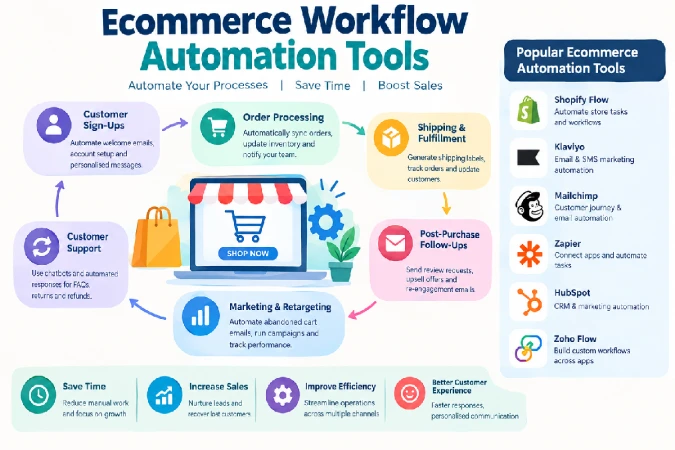
For example, a workflow could be:
New order → update spreadsheet → notify fulfillment team → send customer email → create accounting record
Popular workflow automation platforms include Zapier, Make, and Shopify Flow for eligible Shopify plans and use cases.
These tools can integrate ecommerce sites with other applications, such as email marketing, accounting, customer support, spreadsheets, project management and analytics.
When selecting a workflow tool, check how many integrations it offers, it its limits in automation, the pricing for task or operation, how it does error management and whether it is able to use multi-step workflows.
For a small store, introduce automation through just a couple of workflows that will necessarily offer high value and not by automating every trigger possible. This approach also makes it easy to be able to see that the automation delivers time efficiencies.
Ecommerce Marketing Automation Tools
Marketing automation enables an ecommerce to talk to customers according to their behavior rather than applying an ‘one size fits all’ rule.
Common ecommerce marketing automations include:
- Welcome email sequences
- Abandoned-cart reminders
- Browse-abandonment campaigns
- Product recommendations
- Post-purchase emails
- Customer review requests
- Re-engagement campaigns
- Promotional campaigns
- Customer segmentation
Many the tools available include marketing automation that are especially developed and oriented for ecommerce like Klaviyo, Mailchimp, Omnisend.
For examples: a customer who has put items in a cart can be re-targeted automatically after a certain time period; someone who has bought a product can be re-marketed after a certain number of days with information about that product etc. or a request for reviews.
The bottom line is finding ways to make customer data work for you and not overdo the communication. The goal should be to improve relevance, not inundate customers with too many messages.
For small companies, office tools should be focused on categorization, useful triggers/behaviors, email templates, analytic and integrations with ecommerce all.
Inventory and Order Automation Tools
Inventory and order automation can help prevent stock-related problems while reducing manual data entry.
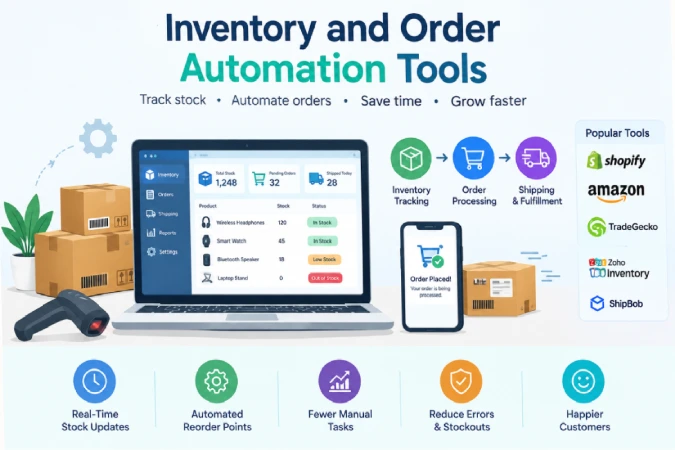
An inventory automation system can automatically:
- Update stock after a sale.
- Adjust inventory after a return.
- Track stock across sales channels.
- Trigger low-stock alerts.
- Create purchase-order workflows.
- Synchronize inventory with fulfillment systems.
For businesses selling through multiple channels, inventory synchronization becomes particularly important. Without automation, a product sold on one channel may not immediately be reflected on another.
Order-management and fulfillment platforms can also automate shipping workflows, order routing, tracking updates, and returns.
However, small businesses should avoid choosing software solely because it offers the largest number of features. The most useful system is one that fits the business’s actual order volume, sales channels, product catalog, and fulfillment process.
How to Choose Ecommerce Automation Software
Choosing ecommerce automation software starts with identifying the tasks that consume the most time or create the most errors.
Identify repetitive tasks
Make a list of processes your team performs repeatedly. Look for tasks involving copying information between systems, sending routine messages, updating spreadsheets, or checking stock manually.
Check integrations
Your automation software needs to work with the systems you already use. Check integrations with your ecommerce platform, payment provider, CRM, email marketing platform, accounting software, shipping providers, and customer-support tools.
Compare pricing
Small businesses should consider the total cost of automation, not simply the monthly subscription.
Check:
- Monthly or annual subscription
- Number of automated tasks or operations
- Number of users
- Integration limits
- Transaction-based fees
- Premium features
- Additional usage charges
A low-cost tool can become expensive if the business quickly exceeds its usage limits.
Evaluate ease of use
If automation requires a developer for every small change, it may not be practical for a small business. Look for visual workflow builders, templates, clear documentation, and straightforward troubleshooting.
Consider scalability
Choose software that can handle increasing orders, customers, products, and automation workflows. Switching systems later can be disruptive, so consider where your business could be in the next few years.
Protect customer data
May contain customer names, email accounts, order information and more. Before connecting business systems, review the security controls, data permissions and handling, as well as any data privacy requirements.
Measure the results
Automation should deliver a quantifiable benefit. Measure metrics such as reduction of time spent, reduction of order-processing mistakes, reduction of customer response time, abandoned cart recovery rates, inventory accuracy, and increased marketing revenue.
Final Thoughts
The most suitable ecommerce automation tools for small businesses will vary depending on the processes you want to automate, the systems you already have in place and your budget. Workflow platforms integrate various business applications, marketing automation facilitates personalized engagement with customers and inventory and order management tools automate operational manual work.
Begin automation efforts with a couple of repetitive processes where a failure is immediately evident and shows an impact on the business. When these processes are working efficiently, extend automation over time to marketing, fulfillment, stock, support, and reporting.
It‘s not about automating every aspect of human input. But by using automation intelligently, ecommerce entrepreneurs can free up precious time to concentrate on their customers, their products, their strategies and their businesses.