

Ecommerce Website Maintenance: Complete Checklist
Last Updated: September 10, 2026
Ecommerce Website Maintenance. Website maintenance is the active process of maintaining, protecting, and improving an online shop to ensure its security, speed, functionality, freshness, and usability. Regular maintenance helps to prevent techgic issues, Guard your customer‘s information, improve SEO, and reduce lost sales from broken pages or issues in the checkout process.
In order to prevent any issues, rather than maintenance on an ad hoc basis, a schedule should be implemented. Daily checks, weekly one for the immediate issues, and monthly one for the more technical/security/performance issues.
What does Ecommerce Website maintenance involve?
The long term running of an E-commerce website depends on a number of different factors working together.
1. Website Security
Security should also be one of the main concerns of all ecommerce businessmen. Make sure that SSL certificates, security plugins, firewalls and other security measures work properly and are checked often.
You should also:
- Update ecommerce software and plugins.
- Remove unused themes, extensions, and applications.
- Review administrator accounts and permissions.
- Monitor suspicious login attempts.
- Scan the website for malware and vulnerabilities.
- Maintain regular backups.
- Ensure customer and payment information is handled securely.
2. Software and Plugin Updates
Content management system, ecommerce softwares, theme, plugin and extension are updated regularly. In some cases, these updates are to fix bugs, increase operations or to fix security exposed.
Make backups before installing big updates and test the changes when possible.
3. Product and Content Updates
Product information should remain accurate and current. Review:
- Product names and descriptions
- Prices
- Product images
- Stock availability
- Product variations
- Shipping information
- Discount codes
- Return and refund policies
Remove discontinued products or redirect their URLs to relevant alternatives when appropriate.
4. Website Backups
A safe backup method is a way of defending your business against anything that might go wrong if your website is compromised or infected with a virus or if your programs have a fault.
If possible keep automated backups of the website files and the database. These should be stored away from the live website and checked regularly to ensure they can be recovered.
5. Performance Monitoring
Website speed can have a direct impact on the shopping experience. Slow loading of product pages, images, search results and checkout screens can cause visitors to leave before they have finished shopping. Monitor page load times, server performance, image sizes, caching, and mobile performance on a consistent basis.
Ecommerce Website Maintenance Tasks to Perform Weekly
Weekly maintenance detects faults early, before they become serious problems
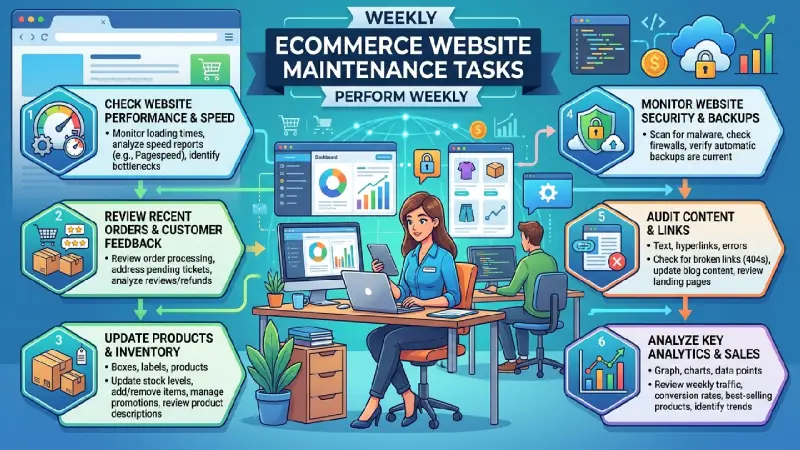
Weekly Ecommerce Maintenance Checklist
- Test the website
Visit the homepage, category pages, product pages, cart, checkout, login page, and contact forms. Make sure important functions work correctly.
- Check product availability
Verify that products marked as available are actually in stock. Review products with low inventory and ensure out-of-stock products are displayed correctly.
- Test the shopping cart
Add several products to the cart and verify that:
- Quantities can be changed.
- Products can be removed.
- Prices are calculated correctly.
- Discounts are applied correctly.
- Shipping costs are accurate.
- Taxes are calculated correctly.
- Test checkout
Perform a test transaction when appropriate. Check that customers can move through each checkout step without errors.
Pay particular attention to payment failures, address validation, coupon codes, shipping calculations, and confirmation messages.
- Check website forms
Test contact forms, newsletter subscriptions, account registration, password recovery, and other important forms.
- Review error reports
Check website logs, analytics, monitoring tools, and server reports for recurring errors or unusual activity.
- Check broken links
Review important internal and external links. Broken links can create poor user experiences and may prevent customers from finding products or completing purchases.
- Review website security
Look for unusual administrator activity, failed login attempts, malware alerts, or unexpected changes to website files.
How to Monitor Ecommerce Website Speed and Performance
Website performance should be monitored regularly because speed can change as products, images, plugins, scripts, and website traffic increase.
Measure Core Performance Areas
Monitor metrics such as:
- Page loading speed
- Largest Contentful Paint (LCP)
- Interaction to Next Paint (INP)
- Cumulative Layout Shift (CLS)
- Server response time
- Mobile performance
- Image loading performance
Test a broad range of important page types don‘t limit yourself to the homepage. Product pages, category pages, search pages, cart pages, and checkout pages may all behave quite differently.
Optimize Images
One of the most common issues for slow pages in ecommerce is large product images. Use image compression and the latest formats (WebP, AVIF) if the browser supports it.
Provide suitable images – rather than uploading very large files and then showing them at a scale five or six times smaller.
Review Third-Party Scripts
Analytics solutions, ad networks, chat widgets, review systems, social plugins and any other third-party scripts.
Periodically review these scripts. Remove services if they are no longer required.
Check Mobile Performance
Most ecommerce traffic will come from mobile phones. Test product browsing, search, cart, checkout on mobile devices.
A site that has a good conversion rate on desktop but is not good on mobile will still potentially lose a lot of sales.
How to Find Broken Links and Checkout Problems
Broken links and checkout errors can directly affect revenue, so they should be identified quickly.
Finding Broken Links
Use website crawling and monitoring tools to identify links returning errors such as 404 Not Found or 500 Server Error.
Prioritize broken links on:
- Homepage
- Main navigation
- Category pages
- Product pages
- Promotional landing pages
- Checkout
- Help and policy pages
When a product or page has permanently moved, use an appropriate redirect rather than leaving customers at a dead end.
Testing Checkout Problems
Checkout should be tested from the customer’s perspective.
Check the complete process:
- Open a product page.
- Add the product to the cart.
- Update the quantity.
- Proceed to checkout.
- Enter shipping information.
- Select a shipping method.
- Apply a coupon if available.
- Select a payment method.
- Complete the transaction.
- Confirm that the order confirmation appears.
- Verify that confirmation emails are sent.
- Check that the order appears correctly in the store’s administration system.
Test different payment methods where possible. A payment gateway can fail even when the rest of the website is functioning normally.
Also monitor cart abandonment and checkout abandonment rates. A sudden increase can indicate a technical problem, unexpected shipping charges, confusing checkout steps, or payment failures.
Monthly Ecommerce Website Maintenance Checklist
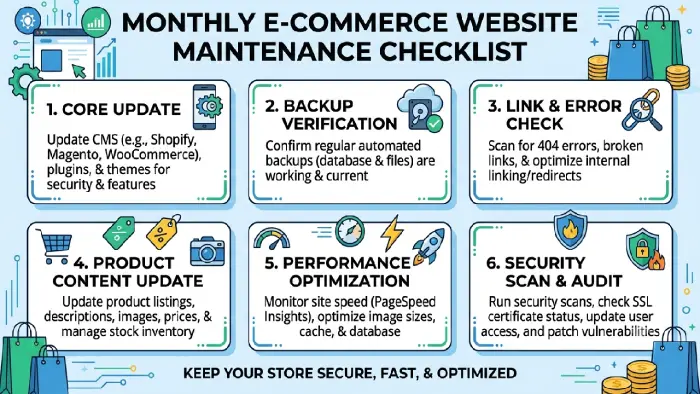
Monthly maintenance should involve a deeper review of the website’s technical health, security, content, and customer experience.
Security
- Review security alerts and logs.
- Check administrator accounts.
- Remove inactive users.
- Update software and plugins.
- Verify SSL/HTTPS configuration.
- Confirm that backups are running.
- Test backup restoration periodically.
- Scan for malware or suspicious changes.
Performance
- Run complete website speed tests.
- Test important product and category pages.
- Review mobile performance.
- Compress newly uploaded images.
- Check caching and CDN performance.
- Remove unnecessary scripts and plugins.
- Review server resource usage.
Ecommerce Functionality
- Test product search.
- Test filters and sorting.
- Test shopping cart functionality.
- Test checkout.
- Verify payment gateways.
- Test discount codes.
- Check tax calculations.
- Verify shipping rates.
- Check order confirmation emails.
- Test customer account functions.
SEO and Content
Review important pages for:
- Broken links
- Missing or duplicate titles
- Missing meta descriptions
- Incorrect canonical URLs
- Outdated product information
- Missing image alt text
- Duplicate product pages
- Incorrect redirects
- Indexing problems
Analytics
Review ecommerce analytics each month to identify unusual changes in:
- Traffic
- Conversion rate
- Revenue
- Average order value
- Cart abandonment
- Checkout abandonment
- Top-selling products
- Poor-performing products
- Traffic sources
Unexpected changes can reveal technical problems that aren’t immediately visible when browsing the website.
Ecommerce Website Maintenance Schedule
| Frequency | Key Tasks |
| Daily | Monitor orders, payment failures, security alerts, and major website errors |
| Weekly | Test website functions, checkout, links, forms, products, and security |
| Monthly | Perform detailed performance, SEO, security, backup, and functionality reviews |
| Quarterly | Review integrations, plugins, hosting, UX, SEO strategy, and overall website health |
| Annually | Conduct a comprehensive security audit, redesign assessment, technology review, and maintenance strategy |
Final Ecommerce Maintenance Checklist
A simple recurring checklist can help prevent important tasks from being forgotten:
- Website loads correctly
- SSL/HTTPS works properly
- Website backups are running
- Security scans show no major issues
- Software and plugins are updated
- Products and prices are accurate
- Inventory information is correct
- Product images are optimized
- Internal links work
- Search and filters work
- Shopping cart works
- Checkout works
- Payment methods work
- Shipping and tax calculations are correct
- Contact and account forms work
- Website speed is monitored
- Mobile experience is tested
- Analytics are working
- SEO errors are reviewed
- Error logs are checked
- Old information is eliminated or updated
Maintenance is ultimately a sales-protection strategy. Checking security, performance, products, links, checkout, and analytics on a weekly/monthly basis allows problems to be quickly recognized and solutions implemented to ensure that customers always find the shopping experience reliable. A maintenance routine is irrelevant if left until customers start to complain about something being broken.