

Ecommerce Marketing Automation: Complete Beginner Guide
Last Updated: September 13, 2026
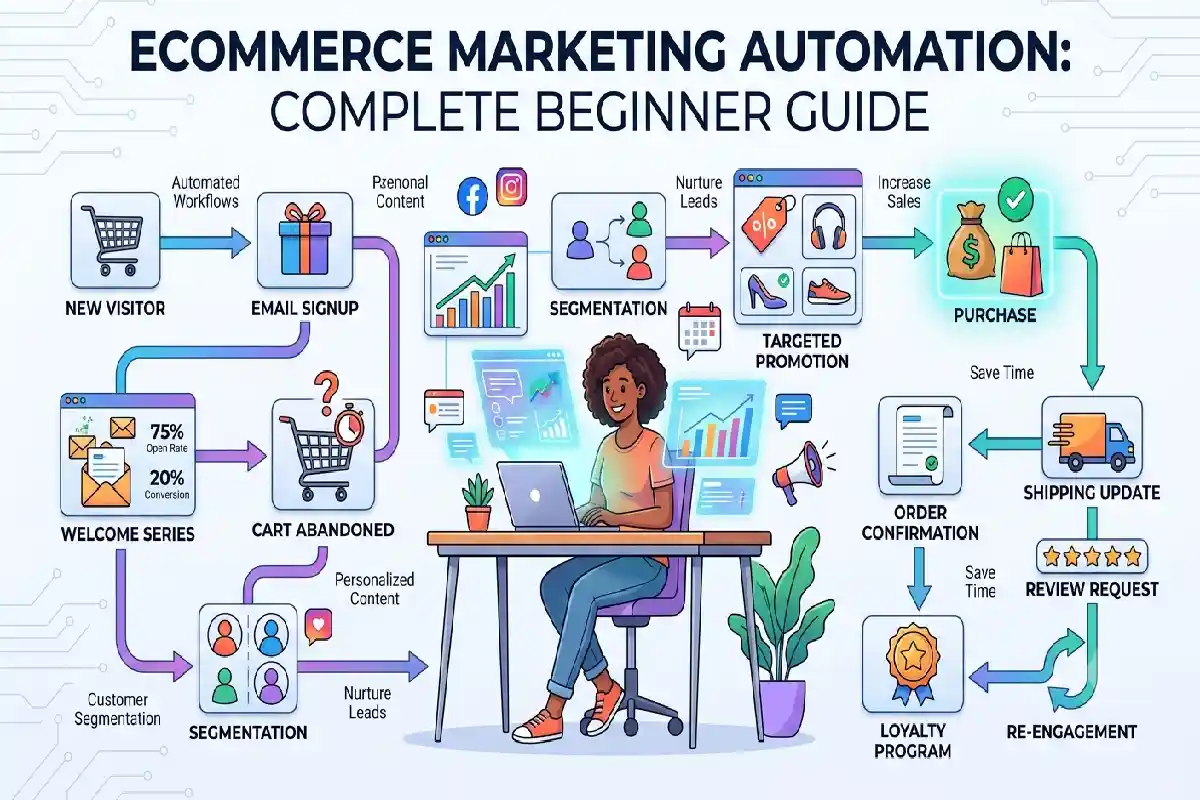
Ecommerce marketing automation enables online stores to save time, communicate more efficiently with customers and ultimately increase sales, by employing software to carry out marketing tasks that are repetitive on auto-pilot. This means, instead of personally sending every email, manually segmenting every shopper or remembering to remind someone about a checkout, marketing automation can do it for you.
The automation is a bit complex for a novice user, but you can begin with some simple workflow and improve then your system gradually.
What are Ecommerce Marketing Automation?
E-commerce marketing automation is software that automatically handles a defined set of marketing activities, based on a set of rules, customer data, actions, etc.
Say for instance, when a customer enrolled in your store, you could have a autoresponder instantly send a welcome message. If that customer put item in cart but did not check out, you could have an autoresponder send the abandoned-cart reminder.
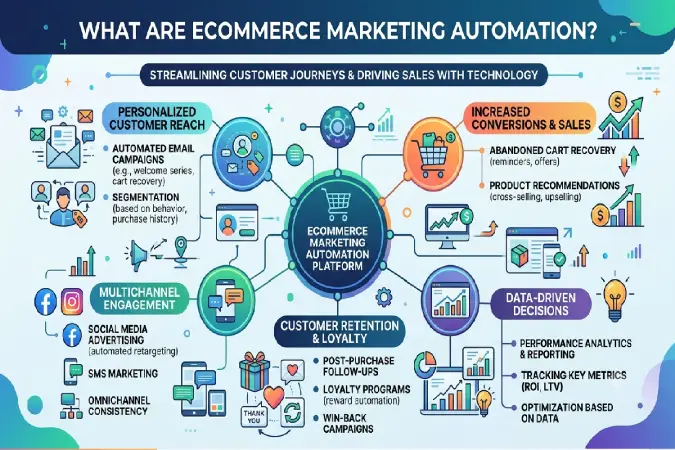
Common ecommerce automation activities include:
- Welcome emails
- Abandoned-cart reminders
- Order and shipping updates
- Product recommendations
- Post-purchase emails
- Customer re-engagement campaigns
- Discount and promotional messages
- Birthday or anniversary offers
- Review requests
- Loyalty program communications
A simple sequence Communication between loyalty programs.
The most compelling benefit is that automation enables a small ecommerce business to deliver personalized communication without a person handling every one of those efforts.
Best Ecommerce Tasks to Automate
Not all marketing activities require automation. Focus initially on tasks that are repeated often and have well-defined customer path.
1. Welcome Emails
Automatically welcome new potential customers, provide information about your brand, and occasionally offer your first time purchase incentive where appropriate.
2. Abandoned Cart Recovery
Automatic email that rebuyabandoned shopping cart, when consumers leave their online shopping cart.
A simple sequence might include:
- Reminder shortly after abandonment
- Follow-up explaining product benefits
- Final reminder or incentive
3. Post-Purchase Communication
After someone purchases, automated messages can provide useful information such as:
- Order confirmation
- Shipping updates
- Delivery information
- Product-use instructions
- Review requests
- Cross-selling recommendations
4. Customer Re-Engagement
Can be set to automatically target customers that have not made a purchase in some time with appropriate content, new product launches or special deals.
5. Product Recommendations
Customer behaviors such as usage and shopping patterns can facilitate the recommendation of cross-sell/upsell products.
This can be seen in practice when an individual buys a pair of running shoes and then might begin to be targeted with advertisements for running socks, sports clothing and accessories.
6. Review Requests
Automatically requesting reviews from customers once the product is delivered enables online businesses to obtain more social proof without having to reach out to each customer manually.
Ecommerce Email Automation Workflows
Email automation is one of the easiest places for an ecommerce business to begin.
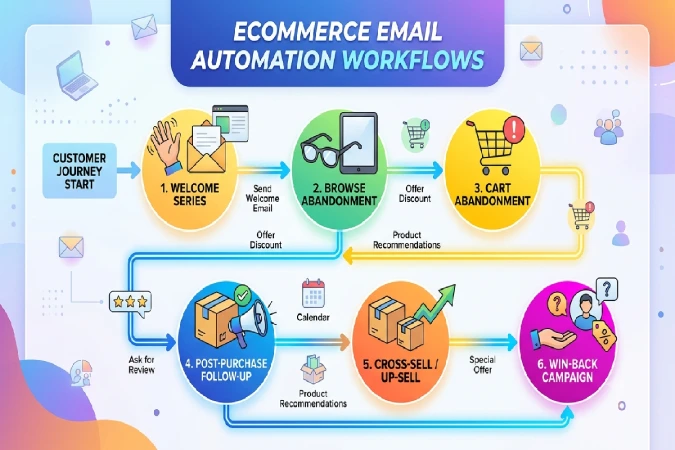
Welcome Series
A welcome series introduces subscribers to your business instead of sending one isolated email.
A basic sequence could look like:
Email 1: Welcome and brand introduction
Email 2: Best-selling products or key benefits
Email 3: Helpful educational content
Email 4: Special offer or incentive
The goal should not always be immediate selling. Building trust can make future promotional emails more effective.
Abandoned Cart Workflow
An abandoned-cart workflow nurtures shoppers who added to cart but didn‘t purchase.
The initial note can just be a gentle reminder about any items they might have abandoned in there? An email sent a little later can easily take care of any questions such as shipping, returns, or advantages of the product.
Don‘t overdo it by sending too many reminders using tough language can harm your customer relations.
Post-Purchase Workflow
After the order has been filled, automation‘s becomes a follow-up tool.
For example:
Day 0: Purchase confirmation
Day 2: Shipping information
After delivery: Product tips
Several days later: Review request
Later: Related-product recommendation
This turns a single transaction into an ongoing customer relationship.
Win-Back Workflow
A win-back campaign: consumer 1 who has ceased to buy.
For instance, a brand might automatically recognize when customers have been inactive for 60 or 90 days, and then send out a series of targetted, value-packed messages, new products, or a relevant incentive.
Customer Segmentation and Personalisation Automation
Taking the identical message to all your customers will not usually be the most suitable solution.
Customer segmentation: Segments shoppers into groups according to their characteristics or behavior. Logistics can then send targeted communication to each group.
Common ecommerce segments include:
- New subscribers
- First-time customers
- Repeat customers
- High-value customers
- Customers who have not purchased recently
- Frequent product viewers
- Cart abandoners
- Customers interested in a particular category
For example, a customer who frequently buys skincare products could receive skincare-related recommendations rather than irrelevant messages about unrelated products.
Behavioral Personalisation
Automation can respond to actions such as:
- Products viewed
- Categories visited
- Previous purchases
- Cart activity
- Email engagement
- Purchase frequency
Personalization can also include the customer’s name, product recommendations, previous purchases, or relevant offers.
However, personalization should provide genuine value. Using excessive customer data or sending messages that feel intrusive can reduce trust.
How to Build an Ecommerce Marketing Automation Workflow
Building an automation workflow is easier when you start with one specific customer journey.
Step 1: Define Your Goal
Decide what you want the workflow to accomplish.
Examples include:
- Recover abandoned carts
- Increase repeat purchases
- Welcome new subscribers
- Generate product reviews
- Re-engage inactive customers
A specific goal makes it easier to measure success.
Step 2: Identify the Trigger
The trigger is the event that starts your automation.
Examples include:
- Customer subscribes
- Customer completes an order
- Customer abandons a cart
- Customer reaches a specific customer-value level
- Customer has not purchased for 90 days
Step 3: Create the Customer Segment
Determine who should enter the workflow.
For example, an abandoned-cart workflow should target shoppers who added products to their cart but did not complete checkout.
Step 4: Plan the Messages
Map out the emails or other communications customers will receive.
Keep each message focused on one purpose. Your workflow might contain two or three messages initially rather than a complicated sequence.
Step 5: Add Personalisation
Use available customer and behavioral data to make communications more relevant.
Product names, recommendations, purchase history, and customer segments can all help create more useful messages.
Step 6: Set Timing and Conditions
Decide when each message should be sent and what happens if the customer takes an action.
For example, if someone completes their purchase after an abandoned-cart email, they should automatically leave the abandoned-cart workflow rather than continue receiving reminders.
Step 7: Test Everything
Before activating the workflow, test:
- Email formatting
- Links
- Discounts
- Personalization fields
- Mobile display
- Trigger conditions
- Exit rules
A small technical mistake can affect many customers when automation is running at scale.
Step 8: Measure and Improve
Track metrics such as:
| Metric | What It Shows |
| Open rate | How many recipients open emails |
| Click-through rate | How many engage with links |
| Conversion rate | How many complete the desired action |
| Revenue per email | Revenue generated by campaigns |
| Cart recovery rate | Effectiveness of abandoned-cart automation |
| Unsubscribe rate | Whether messaging is becoming excessive |
Apply these findings to test new subject lines content timing segmentation offers
Final Thoughts
Ecommerce marketing automation is a means for online business firms to provide more immediate and targeted messages and a means to minimize redundant chores which require more repetitive effort. For beginners, they need not include dozens of complex workflows.
The optimal starting point is to implement high-value automations (welcome series, abandoned cart recovery, post-purchase communication, review requests, re-engaging existing customers, et al). Once your foundational automations are functioning, you should add on deeper segmentation, deep behavioral personalisation, targeted product recommendations and other advanced automations.
The trick is to use automation to improve the customer experience rather than bombard them with even more marketing messages. If done right, relevant, timely and useful automation can be an essential ingredient to increasing ecommerce sales.