


Ecommerce Order Management for Small Businesses: Complete Guide
Last Updated: September 21, 2026
Online store operations go beyond just taking payments From order confirmation and updating inventory, picking and packing, tracking shipments, to communicating and ensuring high levels of customer satisfaction and retention. Ecommerce order management for small business helps make order management a comprehensive task so that you can turn around orders accurately and be on top of multiple dashboards, spreadsheets, and emails.
When you grow and start selling through multiple channels, having a robust system becomes even more critical. Ecommerce order management system for small business integrates and coordinates your orders, inventories, and fulfillment processes across channels.
What is Ecommerce Order Management?
Ecommerce order management is the process of managing an online order from the moment a customer places it until delivery, cancellation, refund or return.
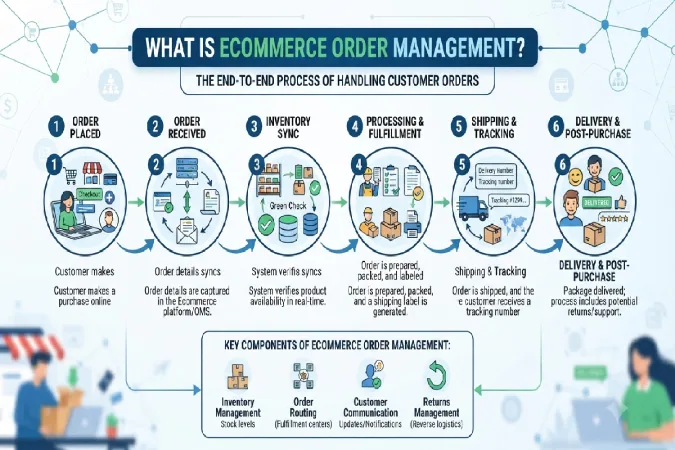
For a small business, this can include:
- Receiving and confirming orders
- Verifying payments
- Checking inventory
- Picking and packing products
- Creating shipping labels
- Updating customers with tracking information
- Processing cancellations and refunds
- Managing returns and exchanges
- Updating inventory after every transaction
You’ll be able to process a handful of orders manually, but issues will begin to crop up as order numbers and sales channels grow. Say for instance, you’re selling through your website, Amazon and Instagram. Each platform has its own record of orders, so it’s easy to end up selling a product twice – which can all be avoided by centralising order management and inventory.
How the Ecommerce Order Management Process Works
A typical ecommerce order-management workflow looks like this:
Customer places order → Payment confirmed → Inventory checked → Order routed → Pick & pack → Ship → Tracking updated → Delivery → Return/refund if required
1. Capture the order
The system receives the customer’s order information, including products, quantities, payment and shipping details.
2. Verify payment and inventory
Before fulfillment, confirm that payment has been successfully processed and that the requested products are available.
3. Allocate inventory
Inventory should be reserved for the order so another customer cannot purchase the same stock.
4. Pick and pack
The fulfillment team selects the products, checks the order and prepares the package.
5. Ship the order
The shipment is handed to the appropriate carrier and tracking information is generated.
6. Update the customer
Automated notifications can tell customers when their order is confirmed, shipped and delivered.
7. Handle exceptions
Damaged products, failed payments, address problems, stock shortages, cancellations and returns should have clearly defined workflows.
This lifecycle closely matches the modern OMS process described by Shopify, which includes order capture, routing, fulfillment, shipping-label generation and exception handling.
How to Track Orders Across Multiple Sales Channels
Multichannel selling creates one of the biggest order-management challenges for small businesses.
You might receive orders from:
| Sales channel | Common management challenge |
| Online store | Managing orders and inventory |
| Amazon | Marketplace-specific fulfillment requirements |
| Social commerce | Orders arriving through different platforms |
| Wholesale | Larger or recurring orders |
| Physical store/POS | Keeping online and offline inventory synchronized |
Instead of checking each platform individually, consider using a centralized dashboard that brings orders and inventory together.
This becomes especially useful when inventory levels are changing frequently. By linking the store with other sales channels, Shopify and other advanced platforms can keep inventory and order data in sync. OMS platform can do the same for storefronts, markets, fulfillment providers and warehouses.
2026 Order-Management Data Snapshot
Recent logistics research highlights how fragmented ecommerce operations can become:
| 2026 finding | Data |
| Organizations using 3+ platforms to manage shipments | 66% |
| Organizations relying on a single shipment-management system | 4% |
| Decision-makers with access to all required logistics data | 22% |
| Teams where relevant departments can access logistics data promptly | 43% |
FedEx’s 2026 logistics research reports that two-thirds of organizations use at least three platforms for shipment management, while only 4% use a single system.
Simple visual:
3+ shipment platforms ██████████████████████████████████ 66%
Single platform ██ 4%
For a small business, the lesson isn’t necessarily to buy an enterprise OMS immediately. It is to reduce unnecessary fragmentation as your operation grows.
When Should a Small Business Automate Order Management?
Automation makes sense when repetitive manual work starts creating delays or errors.
Consider automation when you regularly experience:
- Multiple sales channels
- Increasing daily order volume
- Frequent inventory discrepancies
- Repetitive shipping-label creation
- Manual tracking updates
- Duplicate data entry
- Frequent customer “Where is my order?” messages
- Regular returns and exchanges
You don’t have to automate everything at once.
Start with repetitive, predictable tasks such as:
Order confirmation → Inventory update → Shipping label → Tracking notification
Finally, start thinking about more sophisticated automation for routing, returns, customer support, and inventory forecasting. Automation is on the rise in ecommerce: Shopify’s 2025 study found 58% of the world’s companies were already using some kind of ecommerce automation in 2025 and Gorgias found 96% of ecommerce professionals were using AI in their work in 2026.
What we’re not saying is that every small business needs an AI-based OMS. The first step should always be the workflow that takes up the most time or has the most issues.
How to Reduce Ecommerce Order Processing Errors
Small businesses can reduce mistakes without implementing complicated technology.
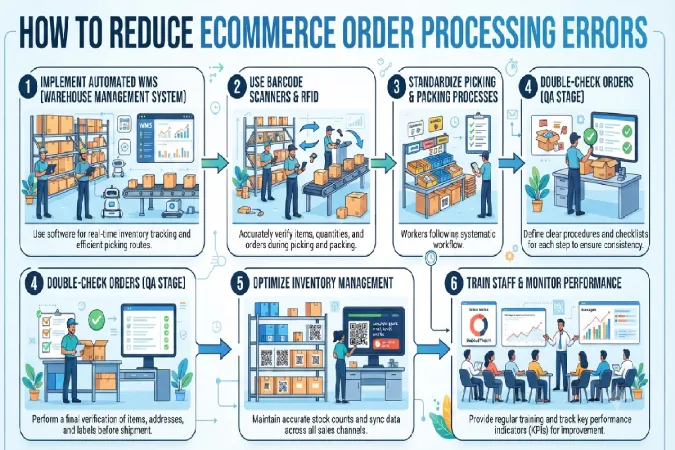
Use a standardized workflow
Every order should follow the same basic process:
Verify → Pick → Check → Pack → Ship → Track
Use barcode scanning where practical
Barcode scanning can reduce mistakes when selecting products, particularly as SKU counts increase.
Synchronize inventory
Avoid manually changing inventory on every marketplace. Automated synchronization can reduce the risk of overselling.
Create exception rules
Define what employees should do when:
- An item is out of stock
- A payment fails
- The customer changes an address
- A package is damaged
- A shipment is delayed
- A customer requests cancellation
Review failed orders
Don’t simply fix mistakes. Record why they happened. Over time, patterns can reveal problems with inventory, staff workflows, integrations or shipping processes.
Conclusion
Lastly, begin considering more advanced automation for routing, returns, customer service, and inventory forecasting. Automation is trending in ecommerce: a 2025 survey from Shopify revealed 58% of the world’s companies were already implementing some type of ecommerce automation in 2025, and a 2026 study from Gorgias discovered 96% of ecommerce marketers are utilizing AI in their job.
What we’re not saying is every SMB needs an AI-enabled OMS. What you should be starting with is the workflow that’s most time-consuming or prone to complication.