

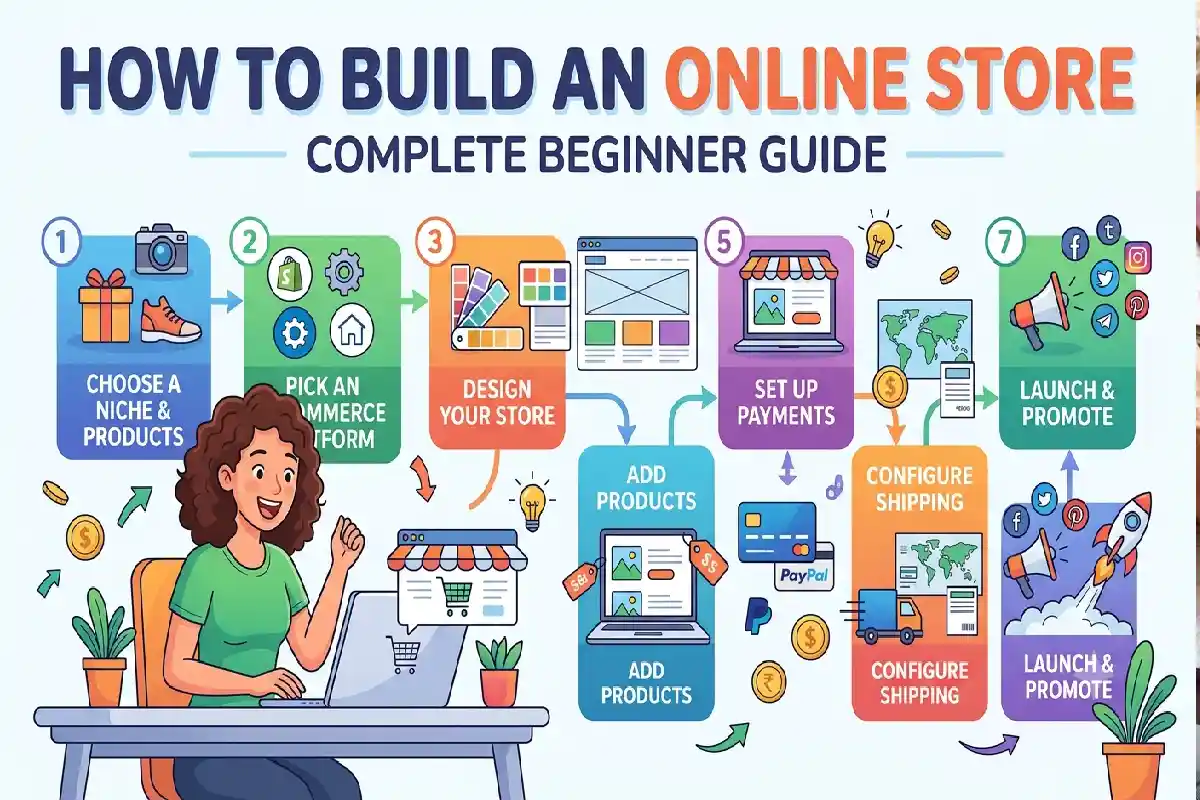
How to Build an Online Store: Complete Beginner Guide
Last Updated: October 14, 2026
How to Build an Online Store. Creating an ecommerce website is one of the easiest paths to launching your own business. An ecommerce website is suitable for anyone who is planning to sell physical products, digitally delivered products, hand made items, private label items or services.
For this reason, developing an online store does not simply mean designing a website template and loading products onto it. You will have to find the most appropriate business model, find the proper ecommerce platform, arrange your online store, implement payments and shipping, design product pages, establish rules and design a plan for generating customers.
The positive aspect of this is that, you don‘t require to spend a lot on technical expertise. Ecommerce tools with features like templates, integrations with payment gateways, inventory management systems, analytical tools and all other such solutions are readily available today to ease your journey.
Full novice to online store in one guide. This comprehensive how-to speaks everything you need to know and do to set up an online store from the ground up planning, choosing a platform, launching, managing and growing.
What are the essentials you require in order to establish an e-commerce website?
Before designing your website and developing your idea, understand the following basic things to run an ecommerce business.
1. A Product or Service to Sell

The foundation of every online store is its offering. You might sell:
- Physical products
- Handmade products
- Clothing and accessories
- Electronics
- Beauty and personal-care products
- Home and lifestyle products
- Digital products
- Online courses
- Subscriptions
- Professional services
Choose your product on its demand by the customer rather than on your own wishes.
Conduct research on your target market, competitors, pricing, product quality, and expected markups before putting money into stock.
Use anything you have doubts over by testing a small product range before jumping into a large purchase.
2. A Target Customer
You need to know who your customers are before you create your store.
Ask questions such as:
- Who needs this product?
- What problem does it solve?
- How old are potential customers?
- Where do they shop online?
- What price range are they comfortable with?
- What influences their purchasing decisions?
- What product concerns potentially will prevent their purchasing?
Having a clearly defined target audience allows you to write improved product descriptions, running ads, content for your website and offers.
3. A Business Name and Domain
Your business name should be memorable, pronounceable and easy to spell. It‘s also a good idea if it is descriptive of what you do.
You will also need a domain name, such as:
Yourbrand.com. As a means, yourbrand.com provides consumers with the ability to order global products or services on demand. It‘s solely web-based and appears to focus on enabling consumers to access their favorite brands anywhere in the world (yourbrand.com).
Keep it as short as possible and don‘t include excessive numerical information, hyphenations or intricate spelling.
Ensure the name is free before you invest in your brand. Also check that it is free from any existing trademark or business.
4. Ecommerce Platform
An ecommerce platform provides the technology required to create and operate your store.
Instead of building everything from scratch, you can use a platform that provides:
- Website hosting
- Store templates
- Product management
- Shopping carts
- Checkout
- Payment integration
- Inventory management
- Order management
- Analytics
- Security features
Your optimal platform will largely depend on your price point, technical capabilities, product nature, sales volume and features needed.
5. Product Photography and Content
Online customers are unable to touch the products. The importance of your imagery and descriptions is essential to build the confidence.
Product pages should generally include:
- High-quality photographs
- Multiple viewing angles
- Product specifications
- Dimensions or sizing
- Materials and ingredients where applicable
- Key benefits
- Usage instructions
- Shipping information
- Return information
Use clear, accurate information rather than exaggerated claims.
6. Payment Processing
Customers need a convenient way to pay for their orders.
Depending on your country and audience, payment options may include:
- Credit and debit cards
- Digital wallets
- Bank transfers
- Local payment methods
- Buy-now-pay-later services
- Cash on delivery, where appropriate
Choose payment providers that are compatible with your ecommerce platform and target market.
7. Shipping and Fulfillment
If you sell physical products, determine how orders will reach customers.
You may fulfill orders yourself, work with a third-party fulfillment company, use dropshipping, or combine several methods.
Before launching, establish:
- Shipping zones
- Delivery estimates
- Shipping rates
- Packaging requirements
- Tracking procedures
- Return procedures
- Damaged-order procedures
Provide clear information about what the order will involve.
8. Business and Legal needs.
Your ecommerce company might be subject to registration of business, taxation, regulations for consumer protection, privacy, advertising, product safety and ecommerce.
The requirements depend on the country and for each kind of business. You need to check in what rules is your country and your products.
In the first place, your website need to supply you with policies on privacy, returns, refunds, shipping and terms of service clearly.
How to Choose the Right Ecommerce Platform
The selection of an ecommerce platform is one of the most significant choices you will encounter.
The best platform is not the one with the most features. It is the one that has the features you really need and not making your store more complex or costly than it should be.
Hosted vs. Self-Hosted Ecommerce
There are typically two kinds of e-commerce sites:
Hosted Platforms
Most of the technical backbone is already provided for you by a hosted platform.
You then pay a monthly fee and get hosting, security, software updates, templates and ecommerce.
These formats generally work well for the novice user as there is no requirement to set up servers and other technical infrastructure.
Self-Hosted Platforms
Using self-hosted ecommerce software, such as a one-off purchase such as (X, Y), means you retain more control over your website and the environment in which it runs.
It can be a great deal of flexibility, but it will be more difficult to use. You might have to be responsible for hosting, keeping it current, security, backups, themes, plugins, and so on.
The fact that a hosted platform might be quite easy to work with might be a positive. For a business that has specific needs for customization another option may be a self- hosted.
Important Features to Compare
When evaluating platforms, compare the following:
Another advantage of the popular software packages is their ease of use. Using applications like IDL or a statistical package is more convenient than manual calculations because the software manages many tedious and repetitive steps. This advantage is especially significant in complex data processing procedures with numerous iterations, where the software‘s automatization simplifies the task.
You Can you build products, take orders, edit pages and make updates to your website without help from the techie?
Pricing. A decision to charge tuition fees was made publicly available, which led to speculation as to what the rate might be so that those who would not be attending would have time to seek other education options. Charges were announced a week before term start.
Look at the overall cost of it not just in the price of your subscription.
Potential expenses include:
- Monthly platform fees
- Transaction fees
- Payment processing
- Premium themes
- Apps and plugins
- Domain registration
- Marketing tools
- Development costs
Payment Options
Know that the system you choose can handle the methods of payment your customers are going to be using.
Design Flexibility
Search for responsive templates that are compatible with desktops, tablets and smart phones.
Inventory Management
Good management of your inventory is vital if you sell several products or options.
Shipping Integrations
In terms of your platform, there should be fairly straightforward methods of finding out how much shipping will cost, printing labels, tracking an order and getting delivery information.
SEO Features
Search Engine Optimization allows your products to be located by search engines. Discover the features which allow you to modify your page titles, descriptions, URLs, image details, structured data, and other SEO options.
Analytics
Your store should provide information about:
- Visitors
- Traffic sources
- Product performance
- Conversion rates
- Average order value
- Sales
- Customer behavior
Scalability
Select software that will be capable of growing with your business.
Think long term, switching platforms later is complicated try to anticipate your future needs and avoid overpaying for enterprise features you‘ll never use.
How to Design and Structure Your Online Store
After choosing your platform, the first thing to do is open a store.
Good ecommerce design is more than just good look and feel. It should enable visitors to browse through products, read descriptions, understand the benefits, gain trust in the company and buy quickly and simply.
Start With a Simple Structure
A basic online store might include:
Home → Category → Product → Cart → Checkout
Additional pages may include:
- About Us
- Contact
- FAQ
- Shipping Policy
- Returns and Refunds
- Privacy Policy
- Terms and Conditions
- Size Guide
- Blog or Resources
Keep your primary navigation simple.
If customers cannot quickly figure out where to go, they may leave the website.
Design Your Homepage
Your homepage should immediately communicate:
- What you sell
- Who it is for
- Why customers should care
- What they should do next
A typical homepage can include:
Hero Section
Use a strong headline, supporting message, relevant image, and clear call-to-action.
Featured Products
Highlight popular, new, or best-selling products.
Benefits
Explain what makes your store or products different.
Examples might include:
- Free shipping over a certain order value
- Carefully selected products
- Sustainable materials
- Fast processing
- Personalized service
Only make claims that you can support.
Customer Reviews
Authentic reviews can help reduce uncertainty and build trust.
Categories
If you have a large catalog, provide clear links to important product categories.
Frequently Asked Questions
Answer common questions about shipping, returns, sizing, materials, or product usage.
Create Effective Category Pages
Category pages help customers browse your product catalog.
For example, a clothing store might organize products into:
- Men’s Clothing
- Women’s Clothing
- Accessories
- Shoes
- New Arrivals
- Sale
Avoid creating too many categories with only one or two products.
Use descriptive category names and provide filtering options when appropriate.
Filters can include:
- Price
- Size
- Color
- Brand
- Material
- Product type
- Availability
Build High-Quality Product Pages
Your product page is one of the most important parts of your ecommerce website.
A strong product page should answer the customer’s main questions before they purchase.
Product Title
Use a clear, descriptive title.
Product Images
Provide multiple high-quality images.
Whenever possible, show:
- Front and back views
- Close-ups
- Product dimensions
- Product in use
- Different colors or variants
Product Description
Explain the product’s benefits and important characteristics.
Do not simply copy supplier descriptions. Create original content that addresses the customer’s needs.
Price
Make the price highly visible.
If you offer discounts, communicate the original and current prices accurately.
Variants
Clearly display available sizes, colors, quantities, or configurations.
Availability
Let customers know whether an item is available.
Call-to-Action
Use a clear button such as Add to Cart or Buy Now.
Shipping and Returns
Provide access to important information before customers reach checkout
How to Add Products, Payments and Shipping
After designing your store, you need to configure the operational side of the business.
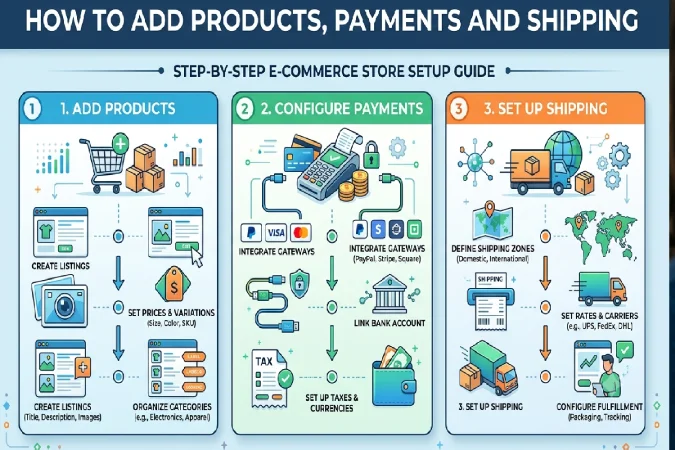
Adding Products
When adding each product, prepare the following information:
- Product name
- Description
- Price
- Images
- SKU
- Inventory quantity
- Product category
- Variants
- Weight
- Dimensions
- Shipping information
- SEO title
- Meta description
Use consistent formatting throughout your catalog.
If your store has 100 products, inconsistent descriptions and images can make the website look unprofessional.
Organize Product Variants
Products may have different sizes, colors, materials, or packages.
For example, a T-shirt might have:
Sizes: Small, Medium, Large, XL
Colors: Black, White, Blue
Each combination may require its own inventory quantity.
Set up variants carefully so that customers cannot accidentally purchase products that are unavailable.
Configure Payments
Connect your preferred payment provider and test the checkout process.
Do not assume that payments work simply because the integration says it is active.
Perform a test transaction or use the platform’s test mode where available.
Verify:
- Payment authorization
- Order confirmation
- Customer emails
- Refund functionality
- Payment status
- Order records
Security should be a priority. Never collect or store sensitive payment information in an insecure manner.
Set Up Shipping
Create shipping rules based on your business model.
You might offer:
- Flat-rate shipping
- Free shipping
- Weight-based shipping
- Location-based shipping
- Carrier-calculated shipping
- Local pickup
While free shipping may encourage customers to place orders, just make sure that when doing your margin calculation, you consider the effect you will have to pay the shipping fee.
For instance, if an ave. order has a $20 gross margin and the shipping on that order is $8, then you are taking away that much to pay for shipping and leaving less to cover advertising, returns, service etc.
Establish a Return Policy
A clear return policy reduces uncertainty.
Your policy should explain:
- Which products can be returned
- Return time limits
- Product condition requirements
- Who pays return shipping
- Refund timing
- Exchange procedures
- Exceptions
Ensure the policy is easy to locate. Don‘t hide it away in fine print.
3. How to Create and Operate an Internet Business.
The fact that you are opening your shop is one of the biggest steps, and one which, due to its absolute importance that can be made over the course of opening a shop, pales into insignificance.
Prepare a launch checklist prior to making your website available to the world.
Test the Entire Customer Journey
Did your website as potential customer.
Start from the homepage and go through the entire purchasing process.
Check:
- Navigation
- Product pages
- Search
- Filters
- Add-to-cart functionality
- Cart calculations
- Discount codes
- Shipping rates
- Payment processing
- Order confirmation
- Customer emails
- Mobile experience
Test different devices and browsers where possible.
Check Your Website on Mobile
Mobile usability should be a major priority.
Look for:
- Text that is too small
- Buttons that are difficult to tap
- Images that load slowly
- Menus that are difficult to use
- Checkout fields that are difficult to complete
- Horizontal scrolling
- Slow page performance
A customer should be able to browse and purchase without needing a desktop computer.
Install Analytics
Analytics help you understand what happens after launch.
Important ecommerce metrics include:
Conversion Rate
The percentage of visitors who complete a desired action, such as making a purchase.
Average Order Value
The average amount customers spend per transaction.
Customer Acquisition Cost
The amount you spend to acquire a new customer.
Cart Abandonment Rate
The percentage of customers who add products to their cart but do not complete checkout.
Repeat Purchase Rate
Customer retention rate th percentage of customer spend with the company from the previous period.
Scope these indicators so that you can use them to quantify and diagnoses issues and opportunities.
Marketing Your New Online Store
If no one is aware that a store is there, no one can find it and a store has been unable to sales.
Design a marketing plan,targeted to your general audience.
Search Engine Optimization
SEO enables your product and category pages to be indexed.
Basic ecommerce SEO includes:
- Keyword research
- Descriptive product titles
- Useful product descriptions
- Optimized URLs
- Image optimization
- Internal linking
- Helpful content
- Fast page performance
- Mobile usability
Do not create content solely for search engines. Your priority should be helping real customers.
Social Media Marketing
Social channels are useful for ecommerce brands to showcase products, educate users about them, provide reviews, and encourage community building.
Use the right channels, find the lanes your customers traffic.
Always customize your content according to the platform. Instead of publishing the same content across all your social sites, customize it.
Email Marketing
Email can also be useful for developing continued, long-term customer relationships.
You can create campaigns for:
- Welcome emails
- New products
- Educational content
- Abandoned carts
- Special offers
- Post-purchase follow-ups
- Product recommendations
- Repeat purchases
Always follow applicable email marketing and privacy requirements.
Paid Advertising
Paid advertising can generate traffic quickly, but it can also consume your budget quickly if campaigns are poorly managed.
Start with controlled budgets and track performance carefully.
Monitor:
- Click-through rate
- Conversion rate
- Cost per acquisition
- Revenue
- Return on advertising spend
Do not increase advertising spending simply because traffic is increasing. The objective is profitable customer acquisition.
Managing Inventory and Orders
Once sales begin, operational management becomes increasingly important.
Keep accurate inventory records and establish a process for handling orders.
A basic order workflow might be:
Order received → Payment confirmed → Product selected → Product packed → Shipment created → Customer notified → Order delivered
Watch inventory levels.
If a current product becomes successful the shelf out of stock will cause sales lost. But excess stocks can lock cash and increase expenses for depot.
Utilise information about sales for the forecasting of inventories over time.
Providing Excellent Customer Service
Customer service itself can be a competitive advantage for many small online businesses.
Customers may contact you about:
- Product questions
- Delivery delays
- Returns
- Exchanges
- Damaged products
- Payment problems
- Order changes
Please reply politely.
Create a Frequently Asked Questions section to reduce redundant questions and support loads.
Keep the customers informed about any relevant information concerning their order once they have purchased.
A good post purchase experience can result in reviews, word-of-mouth, and repurchase.
Common Beginner Mistakes to Avoid
Launching Without Market Research
Do not assume customers will buy simply because you like the product.
Using Poor Product Images
Low-quality photography can reduce trust and make products harder to evaluate.
Complicated Navigation
Customers should find important products within a few clicks.
Hidden Costs
Unexpected shipping or additional fees can cause cart abandonment.
Ignoring Mobile Users
A site that performs nicely on the desktop but not on mobile may miss out on potential clients.
Offering Too Many Products
Having an immense catalog can slow down the running of the inventory and make packaging and marketing more complicated.
Begin by selecting a focused area, and then develop it according to the level of demand.
Spending Too Much on Advertising Too Early
Get all of your ducks in a row test your product, website, price point, and conversion process intensively before going all out with your advertising dollar.
Ignoring Customer Feedback
The feedback, queries, requests, returns, and reviews tell you everything you want to know about what you need to do better.
How to Grow Your Online Store
Once the sales are consistent, concentrate on improving the areas of business you have the biggest impact on.
You might increase revenue by:
- Adding complementary products
- Improving product pages
- Increasing average order value
- Developing bundles
- Introducing subscriptions
- Improving retention
- Expanding marketing channels
- Entering new markets
- Building an email list
- Creating a loyalty program
For example, where large quantities of Product A are often bought with large quantities of Product B, you could offer a combined bundle which maximizes convenience and AOV.
Growth should be a matter of numbers not assumptions.
A Simple Online Store Launch Checklist
Before launching, make sure you have completed the following:
Business
- Choose your niche
- Define your target customer
- Select products
- Research competitors
- Calculate costs and margins
- Choose a business name
Website
- Register a domain
- Choose an ecommerce platform
- Select a responsive design
- Create navigation
- Build category pages
- Add product pages
- Create About and Contact pages
Payments and Operations
- Connect payment methods
- Configure taxes where applicable
- Set shipping rates
- Establish fulfillment procedures
- Create return and refund policies
- Configure order notifications
Marketing
- Set up analytics
- Create social media profiles where appropriate
- Prepare email marketing
- Optimize product pages for search
- Develop a launch campaign
Testing
- Test product pages
- Test cart functionality
- Test checkout
- Test payments
- Test shipping calculations
- Test discount codes
- Test emails
- Check mobile usability
Conclusion
Creating an online store is likely to seem a rather daunting task when you first undertake it, but significantly easier thanks to the advent of modern ecommerce technology. It is advisable, however, to be systematic when taking on such a comprehensive challenge:
Get started by selecting a product that will sell. Identifying the right audience is crucial to establishing your ecommerce store. Find the ecommerce platform that meets your technical skill, budget, and plans for expansion.
Create an easy to use, reliable and intuitive website with user-friendly navigation and well displayed, informatively written product pages. Set up payments, checkout, shipping, inventory management and return procedures prior to launching your website. Conduct thorough website and payment gateway testing and ensure mobile responsiveness.
Once up and running, then marketing, customer support, analytics and iterating. Your first product doesn‘t have to be the perfect iteration; it just needs to provide a trusted shopping experience that you can learn from.
An ecommerce store is much more than just a website. It‘s a business system made up of your products, customers, marketing, technology, shipping, money, service and more. Get each part right from the beginning and you will be setting yourself up for long-term online success.