

Best Ecommerce Customer Service Tools: Complete Guide
Last Updated: September 21, 2026
Managing an Ecommerce store is not only about getting visitors and placing orders. Customers want quick and efficient responses when they inquire about products, shipment, payments, returns, refunds, or the order itself.
As the volume of an ecommerce business increases, it becomes impossible to operate every customer conversation by hand. Ecommerce customer service solutions enable ecommerce businesses to manage customer support, interact across touch points, provide automation and empower support staff.
The right software can also enhance the customer experience by providing faster response times and easier access to support both pre- and post-purchase.
This handbook will introduce the most popular types of ecommerce customer service tools, show how they work and what to look for when selecting an online store customer support software.
What customer service tools are a must-have for Ecommerce Retailers?
E-commerce companies will often require multiple customer service solutions instead of one specific tool. The appropriate combination will vary depending on the size of your store, number of orders, channels used and customers’ needs.
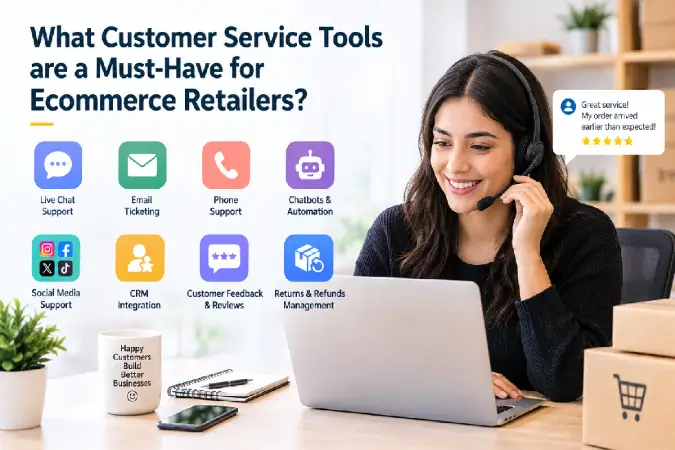
Important ecommerce customer service tools include:
- Help desk and ticketing software for organizing customer requests
- Live chat tools for real-time conversations
- AI chatbots for answering common questions automatically
- Knowledge bases for self-service support
- Customer support automation for repetitive workflows
- Omnichannel support tools for email, social media, messaging, and chat
- Analytics and reporting for measuring support performance
- Ecommerce integrations for accessing customer and order information
For example, imagine a customer contacts your store because an order has not arrived. Instead of asking the customer for their order number and manually searching another system, an ecommerce help desk can connect with the store platform and display relevant order information inside the support workspace.
This reduces the amount of work required from the customer and the support agent.
Essential features to look for
A useful ecommerce customer service platform should ideally offer:
- Centralized customer conversations
- Order and customer history
- Ticket management
- Automated workflows
- Live chat
- AI assistance or chatbots
- Customer self-service
- Performance reporting
- Ecommerce platform integrations
- Mobile or remote support capabilities
The basic level could be a shared inbox and live chat for the small stores, whereas the bigger brands may need intelligent ticket routing, AI agents, an automated workflow, multi-channel support, and reporting.
Ecommerce Help Desk and Ticketing Tools
An ecommerce help desk is an integrated system that consolidates customer support requests allowing agents to address all issues within a single interface.
A help desk is a system that turns individual email accounts, chats and messages on social media into neatly formatted ticket or a conversation.
This becomes especially valuable as support volume increases.
What does ecommerce ticketing software do?
A ticketing system can help teams:
- Create and assign support tickets
- Categorize customer issues
- Prioritize urgent requests
- Track ticket status
- Set response or resolution targets
- Add internal notes
- Use saved replies
- View customer history
- Track support performance
- Automate repetitive actions
For example, a store could automatically categorize incoming requests into:
Shipping → Returns → Refunds → Product Questions → Payment Problems → Order Changes
The appropriate agent or team can then handle each category.
Ecommerce-specific help desk software
General help desk platforms can work well, but ecommerce-focused systems can provide additional context.
An ecommerce support agent may need to see:
- Customer name
- Previous orders
- Order value
- Shipping status
- Tracking information
- Products purchased
- Refund status
- Previous conversations
Having this information available while answering a customer can reduce unnecessary back-and-forth.
Popular platforms in this category include Gorgias, Zendesk, Freshdesk, Help Scout, and eDesk. Each platform has different features, integrations, pricing models, and levels of ecommerce specialization, so businesses business should compare them against their actual support workflow.
When should an ecommerce use a help desk?
A help desk becomes particularly useful when:
- Customer emails are becoming difficult to manage
- Several employees answer support requests
- Customers contact the business through multiple channels
- Support requests are frequently missed
- Agents need access to order information
- Managers need customer service reports
- Repetitive questions consume significant staff time
For a very small store, a shared inbox may be sufficient initially. As ticket volume grows, dedicated help desk software can provide better organization and automation.
Live Chat and AI Chatbots for Ecommerce
Live chat allows customers to communicate with a business directly from its website.
It can be particularly useful when shoppers need quick answers before making a purchase.
For example, a visitor might ask:
“Does this jacket run true to size?”
or:
“Can this product be delivered by Friday?”
Getting an answer while the customer is still shopping can remove uncertainty from the buying process.
Live chat features
Useful live chat functionality includes:
- Real-time conversations
- Agent assignment
- Customer profiles
- Automated greetings
- Chat routing
- Conversation history
- Canned responses
- File or image sharing
- Business-hours settings
- Chat analytics
Live chat can also be connected to an ecommerce platform so agents can provide more relevant assistance.
How AI chatbots help ecommerce stores
AI chatbots can handle common customer questions without requiring an agent to respond manually to every conversation.
Common use cases include:
- Order tracking
- Shipping questions
- Return policies
- Product information
- Store hours
- Payment questions
- Frequently asked questions
- Basic troubleshooting
For example:
Customer: “Where is my order?”
AI assistant: Checks the available order information and provides the relevant shipping status.
If the issue is more complicated, the conversation can be transferred to a human agent.
AI chatbot vs. AI customer service agent
These terms are increasingly used interchangeably, but they can describe different levels of functionality.
A basic chatbot may provide predefined answers to frequently asked questions.
More advanced AI customer service systems can understand customer intent, retrieve information from connected systems, summarize conversations, and in some implementations take permitted actions.
When evaluating AI ecommerce support software, don’t focus only on whether it has an “AI” label. Check what the AI can actually do.
Important questions include:
- Can it access order information?
- Can it recognize customer intent?
- Can it handle returns?
- Can it escalate complex conversations?
- Can businesses control its responses?
- Can agents review AI-generated answers?
- Does it support human handoff?
- How is AI usage priced?
Ecommerce Customer Support Automation
Automation is one of the biggest reasons businesses adopt ecommerce customer service software.
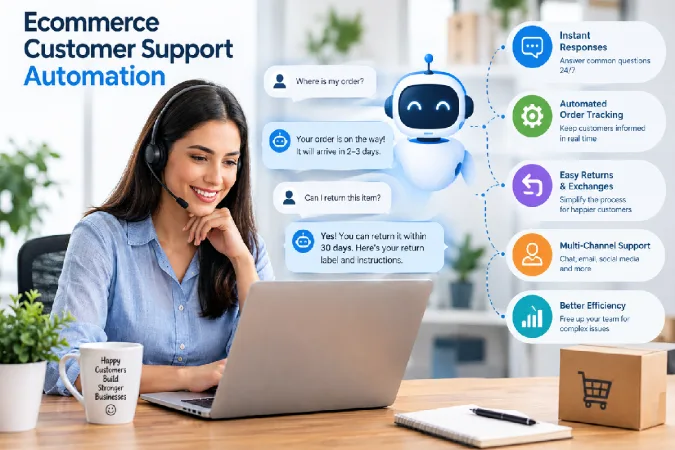
Many customer questions are repetitive. Customers may repeatedly ask about shipping times, return policies, order status, product availability, or payment options.
Automating appropriate tasks allows support agents to spend more time on complicated problems.
Common ecommerce support automation workflows
Automated ticket routing
Incoming tickets can be automatically assigned based on:
- Issue type
- Customer language
- Product
- Sales channel
- Priority
- Agent availability
A refund-related request, for example, can be routed to the appropriate support team.
Automated order-status responses
Order tracking is one of the common reasons customers contact ecommerce businesses.
Instead of requiring an agent to manually investigate every request, an integrated system can provide available shipping information automatically.
Automated return workflows
Customer service software can guide customers through return procedures by providing:
- Return policy information
- Eligibility requirements
- Return instructions
- Relevant links
- Status updates
More advanced integrations may connect support software with returns-management systems.
Saved replies and macros
Support agents can create templates for frequently asked questions.
Instead of typing the same explanation repeatedly, an agent can insert an approved response and personalize it for the customer.
This saves time while maintaining consistent communication.
Automated follow-ups
Businesses can automatically follow up after:
- A support case is resolved
- A refund is processed
- A return is completed
- A customer receives an order
- A support conversation is closed
Automation should still allow customers to reach a human when necessary.
Don’t automate everything
Automation works best for predictable, repetitive tasks.
Complex complaints, unusual order problems, sensitive situations, and cases requiring judgment may need human attention.
The goal is not to eliminate human support. It is to reduce unnecessary manual work while making human assistance easier to access when it matters.
How to Choose Ecommerce Customer Service Software
There is no single customer service platform that is right for every ecommerce business.
The best choice depends on your store’s size, support volume, technology stack, budget, and customer communication channels.
Use the following factors when comparing tools.
1. Check ecommerce integrations
Make sure the software works with your ecommerce platform and other systems.
Depending on your business, you may need integrations with:
- Shopify
- WooCommerce
- BigCommerce
- Magento or Adobe Commerce
- Amazon
- eBay
- Payment platforms
- Shipping systems
- CRM software
- Email marketing platforms
An integration should provide useful data rather than simply connecting two systems.
2. Consider your support channels
Determine where customers currently contact you.
You may need:
- Website chat
- Social media
- WhatsApp or other messaging channels
- SMS
- Marketplace messaging
- Voice support
If customers use several channels, look for software that can centralize conversations and preserve customer context.
3. Compare automation capabilities
Consider which repetitive tasks consume the most employee time.
For example:
| Support task | Potential automation |
| Order tracking | Automated order-status information |
| Common questions | AI chatbot or knowledge base |
| Ticket assignment | Automatic routing |
| Repeated responses | Saved replies |
| Returns | Automated instructions |
| Follow-ups | Scheduled messages |
| Ticket categorization | Automatic tagging |
The more repetitive your support workload is, the more important automation becomes.
4. Evaluate AI features carefully
AI can be useful, but features differ substantially between platforms.
Check whether the tool provides:
- AI-generated responses
- Conversation summaries
- Automated ticket classification
- AI-powered search
- Chatbots
- AI agents
- Suggested replies
- Knowledge-base assistance
- Human escalation
Also investigate how the provider handles data, permissions, quality control, and AI usage limits.
5. Look at reporting and analytics
Customer service software should help you understand how your support team is performing.
Useful metrics include:
- First response time
- Average resolution time
- Ticket volume
- Resolution rate
- Customer satisfaction
- Reopened tickets
- Support volume by channel
- Automation rate
- Agent workload
These metrics can reveal where customers are experiencing recurring problems.
For example, if hundreds of customers contact support about the same product issue, the underlying problem may be unclear product information rather than insufficient customer service.
6. Consider scalability
A tool that works for 100 support conversations per month may not be appropriate when your store receives thousands.
Think about future requirements before choosing software.
Consider:
- Number of agents
- Number of stores
- Number of brands
- Support channels
- Ticket volume
- Automation requirements
- International customers
- Multiple languages
- Reporting requirements
7. Calculate the total cost
Don’t compare software based only on its advertised starting price.
Check:
- Per-agent fees
- AI usage charges
- Automation limits
- Additional channel costs
- Integration costs
- Premium features
- Usage-based pricing
- Implementation expenses
Discounted tool could become costly with volume.
What Are the Top Ecommerce Customer Service Software: Which Ones Are the Best to Use?
The right ecommerce customer service tool for you depends entirely on what your business requires.
Small ecommerce sites can go for low cost, sophisticated ticket handling, live chat, or easy initialization.
As ecommerce businesses grow they may require more they require more centralized customer conversations, ecommerce integrations, automation and reporting, multichannel support.
High end ecommerce brands may need more advanced omnichannel support, more complex workflows, AI support, analytics and reporting, multi teams and more integrations.
Select software for the most part not by the number of features it provides but by your major customer service problems.
If your team is flooded with email, its probably best to focus on the help desk features. Customers require instant responses, perhaps live chat is a better option. If you have agents replying to the same questions over and over again, automation and AI should be considered. Finally, if your customers are interacting on multiple different channels, look into an omnichannel approach.
The best ecommerce customer service setup is one that offers the right balance of individual customer care, self-service, automation, and AI that makes engaging for service the most simple, straightforward experience possible.
Final Thoughts
Ecommerce customer service software can transform a disorganized support department into an organized customer experience. The appropriate tools enable organizations to provide quicker responses, avoid repetitive questions, contain the volume of conversations, and enable agents with greater access to customer data.
Begin by pinpointing what your biggest support issues are; then implement a software solution based on those. A growing number of stores may find a solution incorporating helpdesk, live chat, automation, artificial intelligence, and self-service to be a good base for a scalable customer support operation.