


Best Ecommerce Inventory Management Software
Last Updated: September 21, 2026
Having a manual inventory system becomes more and more problematic as an ecommerce business expands in size. A product may be sold through more than one channel, stock counts may fluctuate during the day, and inaccurate inventory figures can lead to order delays, overselling, or excess stock.
An Ecommerce inventory management software allows organizations to automate processes such as tracking stock, buying, order management and inventory reporting. The right system provides the team with a clearer picture of what they have in stock and enables them to take smarter decisions when buying and fulfilling orders.
In this guide we describe what ecommerce inventory management software is, what features to look out for, which ones are available for small businesses, multichannel inventory management, how to select the most suitable system.
What is Ecommerce Inventory Management Software?
Ecommerce inventory management software is a solution that enables online retailers to control and monitor products through all stages of the purchasing selling, fulfillment and after-sales procedure.
Using inventory management software, businesses can keep track of stock levels on the same software rather than using several separate spreadsheets.
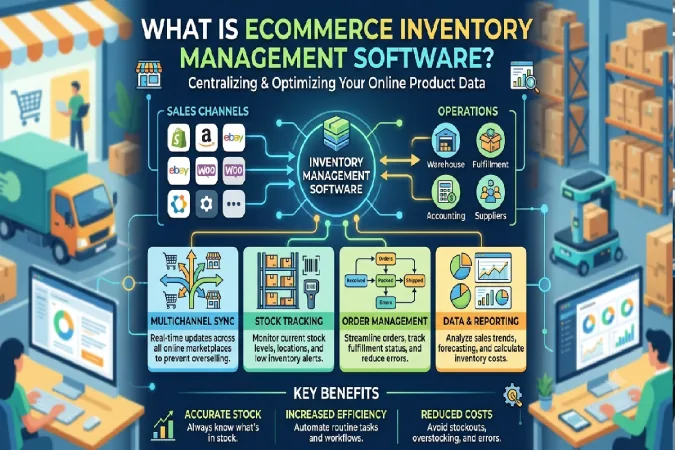
Depending on the platform, businesses may be able to:
- Track available and reserved inventory
- Automatically update stock after orders
- Manage product variants and SKUs
- Monitor purchase orders
- Set low-stock alerts
- Track inventory across warehouses
- Synchronize stock between sales channels
- Manage returns
- Generate inventory reports
- Forecast future inventory requirements
For example, when a customer purchases three units of a product, an integrated inventory system can automatically reduce the available quantity. If the same product is listed on multiple sales channels, the updated stock level can also be synchronized across those channels.
Features to Look for in Inventory Management Software
Not every ecommerce business needs the same features. However, several capabilities are particularly valuable when comparing inventory management systems.
Real-Time Inventory Tracking
The software should provide accurate information about available, committed, and incoming stock. Real-time or near-real time synchronization can be achieved which can lower the risk of selling products that aren‘t actually available.
SKU and Product Variant Management
Stores with multiple sizes, colors, textures or configurations require efficient SKU control. It should simply be easy to manage each variant with its own inventory.
Multichannel Synchronization
As you sell through your own website, marketplaces, social commerce channels or bricks & mortar stores, the more important becomes the proper inventory synchronization.
Low-Stock Alerts
Automated alerts can be set up to advise your team when stock levels hit a certain point. This allows you to reorder products before stockouts affect customers.
Purchase Order Management
The purchase-order capability can all-businesses to monitor, from suppliers, (what) items, (when) they are likely to arrive and in what (how much) quantities and at what (how much) price.
Warehouse Management
For businesses that process orders from multiple warehouses or facilities and have several fulfillment locations – capabilities for warehouse transfers, stock locations, receiving, picking, packing and fulfillment might be required.
Reporting and Analytics
Some of the examples of the useful reports are inventory valuation, stock movement, sales velocity, low stock products, dead stock and product performance.
Integrations
Check whether the system integrates with your ecommerce platform, marketplaces, accounting software, shipping providers, warehouse systems, and other tools used by your business.
Best Inventory Software for Small Ecommerce Businesses
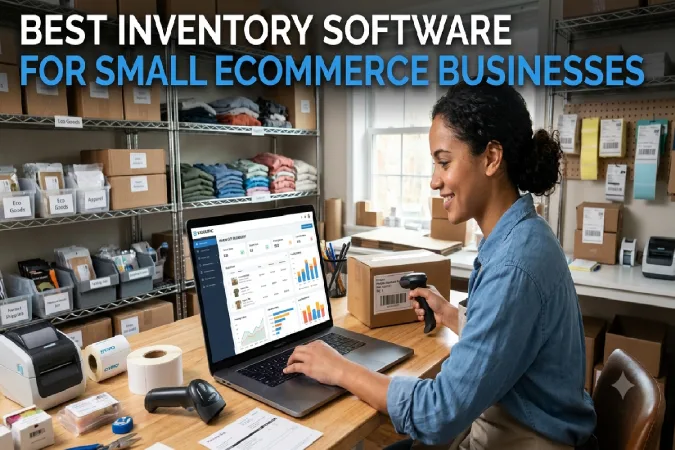
For small ecommerce companies the software should be simple to use and maintain, inexpensive, and scalable for the future.
There are many platforms to consider such as Zoho Inventory, Cin7, inFlow Inventory, Katana or shopping cart functions like those in Shopify.
Zoho Inventory offers inventory and order-management functionality that may meet the needs of the integrated business.
Cin7 is suited to businesses requiring a more advanced system to manage multiple channels and to oversee inventory and order management on a larger scale
InFlow Inventory is an inventory management software that provides features that enable business to organize its products, orders, buying and stock information.
Those businesses that are involved in manufacturing or other processes might also use Katana making it especially suitable for those that are ecommerce enabled.
By evaluating considerations like sku numbers, monthly order volume, sales channels, warehouse needs, integrations, and budget, the most optimal solution can be selected.
Before purchasing, calculate how much inventory complexity your business actually has. A small store with one sales channel may not need the same system as a growing brand selling thousands of SKUs across several marketplaces.
Multichannel Ecommerce Inventory Management
Multichannel ecommerce inventory management means keeping inventory information synchronized across multiple selling platforms.
Imagine a business has 100 units of a product and sells through:
- Its ecommerce website
- An online marketplace
- A social commerce channel
- A physical store
Once the customer ordered 10 units through any channel, the stock available in other channels will be “updated”.
If there was no synchronization, the company might take an order for a prodcut that they where not able to supply.
A multi-channel inventory system can give you a central view of stock, and enable your business to streamline its inventory management.
Ensure that the stock you have available isn‘t already being used to fulfill revenue orders. Allowing this can cause your store to show stock that‘s technically there, but not actually available.
Multichannel management for expanding businesses can also ease warehouse allocation and fulfillment. Orders can be potentially directed according to the inventory stock, warehouse location, delivery necessity or business policies.
How to Choose the Right Inventory Management System
The first step in selecting the suitable inventory management system is to have knowledge about your existing operation and your required future operation.
1. Assess Your Inventory Complexity
Think about the mix of your number of products, SKUs, variants, warehouses, suppliers and sales channels. A straightforward catalog may just need inventory monitoring, whereas a complex setup may necessitate warehouse and buying features.
2. Define Your Must-Have Features
Create a list of essential capabilities before comparing vendors. These might include:
- Real-time stock updates
- Multichannel synchronization
- Purchase orders
- Barcode scanning
- Low-stock alerts
- Warehouse management
- Inventory forecasting
- Reporting
- Returns management
Separating essential features from optional features can make the buying decision easier.
3. Check Ecommerce Integrations
Make sure the software works with your ecommerce platform and other critical systems. Poor integration can create duplicate data and manual work—the exact problems inventory software is supposed to reduce.
4. Compare Total Costs
Look beyond the advertised monthly subscription. Consider additional users, warehouses, orders, integrations, implementation, support, and premium features.
5. Test Ease of Use
A powerful platform is less useful if your team struggles to operate it. Take advantage of free trials or demonstrations where available and test common workflows such as receiving inventory, processing an order, making a return, and adjusting stock.
6. Consider Scalability
Your inventory system should support business growth. Think about whether you may add marketplaces, warehouses, international sales, more SKUs, or additional staff.
7. Review Data and Security Controls
Inventory systems may hold commercially sensitive data on items suppliers orders and customers. For each account review rights to the system, data protection and backups, authentication options and the security practices of the vendor.
Final Thoughts
The best ecommerce inventory management software is not the one with the largest number of features. It is the one which provides you with an accurate picture of your stock, integrates with your sales channels, cuts down on the need for [human] intervention, and is right for your operation.
Small stores may initially be able to operate with only the most basic inventory management capabilities. Larger, growing multichannel businesses will eventually outgrow such capabilities and need to implement dedicated inventory and order-management solutions.
Prior to selecting a platform, you should have already mapped your inventory flow, determined the largest pain points, evaluated integrations and costs, and tested the software against actual business cases. Properly aligning your inventory will enhance your visibility of stock, decrease fulfillment errors, and provide your ecommerce teams additional control in the growth of the business.