

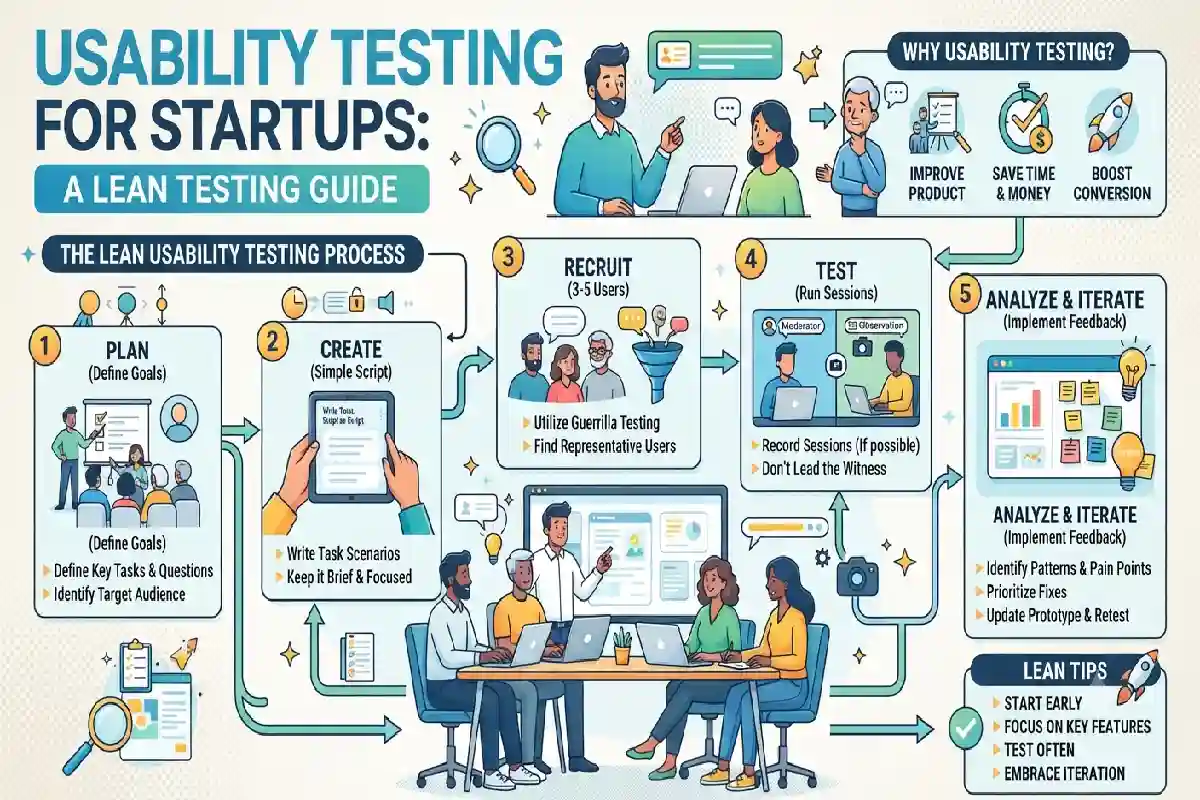
Usability Testing for Startups: A Lean Testing Guide
Last Updated: September 30, 2026
For a startup that has just started out, building a product is really only half the battle. The product has to be simple enough to be understood and simple enough for target customers to complete critical tasks without undue friction or annoyance. A feature can be technically functional even if it creates friction for customers.
By conducting usability testing, startup teams find these problems early on, so they‘re not so costly to fix. Rather than simply asking users if they “like” something, usability testing shows how users go about doing real tasks and notes where they hit a roadblock.
Startups do not always require extensive trial programs or costly research instruments. An intensive investigation can uncover critical issues if the trial‘s goals, the subjects, the activities, and the evaluation method are defined clearly.
Set Task-Based Usability Testing Goals
First, determine what you want the test to find out. A vague such as “test the product” can be hard to evaluate. A specific objective produces more useful findings.
For example, a startup might want to determine whether users can:
- Create their first account
- Find a particular product or feature
- Complete an important workflow
- Understand the next step on a screen
- Recover from an error
- Complete a purchase or subscription
- Find relevant information in a dashboard
Transform these goals into achievable action items.

Rather than asking, ‘How easy is it to checkout?’, present the participant with a scenario: ‘Pretend you want to buy this product and have it delivered to your home address. Proceed to checkout as you normally would.’
Task-based testing reveals the actions of what the users actually do rather than what they think they would do.
Decide what evidence you will gather. For each test this might be task completion, errors, hesitation, unexpected navigation, questions asked or qualitative comments.
Avoid creating too many tasks. A lean usability test should focus on the product’s most important journeys and the areas where the team has the greatest uncertainty.
Recruit Participants Who Match Your Users
The quality of usability findings depends partly on who participates.
Participants should be representative of the target customer that the startup is aiming to support. If the outcome is a tool for small-business owners, testing the product solely on software developers might provide unreliable feedback. Likewise, it will be inaccurate to test a consumer new product on first time users rather than experts.
Define the relevant characteristics before recruiting. These might include:
- Job or industry
- Experience level
- Business size
- Product usage habits
- Specific customer needs
- Familiarity with competing solutions
You aren‘t necessarily supposed to have a large sample for early usability testing. What you are supposed to find are significant usability problems, not statistically representative market surveys.
It may be helpful to involve more than one of the segments if the product is used by more than one important user population. But preserve the boundary between the groups when analysing the data so that variations in experience do not get buried in one overall statement.
Use simple questions to screen participants, and don‘t disclose too much information about the test. Participants who know exactly what problem the team expects to solve have a possibility of changing their behavior away from the natural.
Run Sessions Without Leading Participants
The moderator is responsible for observing and understanding during the session, not introducing to how the product should be used.
Present the task and see what the participant does. Don‘t immediately correct errors or point to the correct button.
In this way, for instance, if a participant says “I don‘t know where to go” do not reply with “Try the settings menu”, as that would not allow the team to determine whether the interface demonstrated the right path.
Instead, you can ask neutral questions such as:
- “What would you expect to do next?”
- “What are you looking for?”
- “What do you think this option means?”
- “What were you expecting to happen?”
Observe behaviour carefully. A participant may complete a task but still reveal friction by repeatedly going back, scanning the screen, missing an important label, or expressing uncertainty.
Also distinguish between usability problems and personal preferences. A participant saying, “I would use a different colour here” is not necessarily identifying a usability issue.
Take structured notes during each session. Record the task, observed behaviour, errors, comments, and relevant context. Consistent notes make it easier to compare findings afterward.
Rank Usability Issues by Severity
Testing may produce more findings than the startup can address immediately. Prioritisation helps the team focus on problems that have the greatest effect on the user experience.
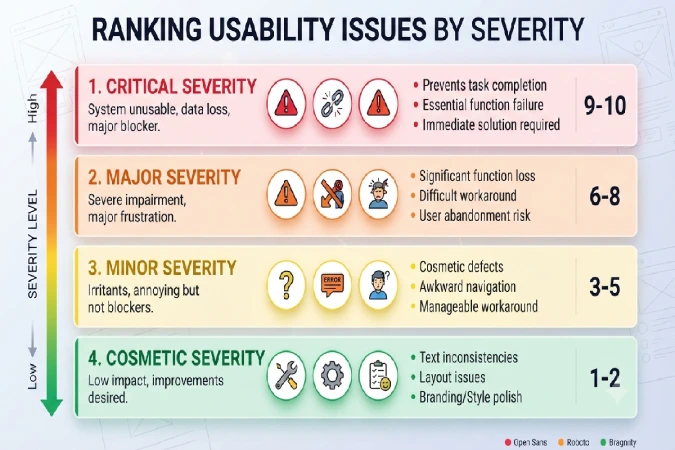
Consider four factors when evaluating each issue:
- Impact: Does the problem prevent users from completing an important task?
- Frequency: How many participants encountered it?
- Task importance: Does it affect a core product journey or a minor function?
- Workaround: Can users reasonably recover, or does the issue leave them stuck?
A simple severity scale can help:
- Critical: Prevents completion of an essential task or creates a major failure.
- High: Causes substantial confusion or makes an important task difficult.
- Medium: Creates noticeable friction but users can generally continue.
- Low: Minor inconvenience or improvement opportunity.
For example, if most participants cannot find the button required to complete a core workflow, the issue deserves attention before launch. A minor spacing preference on a secondary screen may not.
Avoid treating the number of complaints as the only measure of importance. A problem experienced by one participant can still matter if it affects a critical workflow.
Document each finding clearly. A useful issue record can include the problem, affected task, evidence, severity, likely cause, and proposed next step.
Retest Changes and Document What Improved
Fixing usability problems is only part of the process. Teams should verify whether the changes actually improved the experience.
After making significant changes, repeat the affected task with new participants when possible. Using new participants can reduce the effect of familiarity with the earlier version.
Compare the results against the original findings.
For example, suppose participants previously struggled to find the account setup option. After changing the navigation, the team can test whether users now identify the correct path more quickly and with less hesitation.
Do not assume that every change is automatically an improvement. A modification can solve one problem while creating another.
Keep a simple usability-testing record containing:
- Test date
- Product version
- Participant profile
- Tasks tested
- Major findings
- Severity
- Changes made
- Retest results
- Outstanding issues
This produces a number of re-usable history of product decisions. It also helps the team avoid solving the same design problem again.
Conclusion
There is a way for startups to discover issues with their product early and cost-effectively. It doesn‘t have to be a complex process. Have task-based objectives based on key paths, recruit participants that mirror your ideal user, and keep the session as neutral as possible.
After the test, classify the results on the basis of how serious, frequent they are and the level of importance of the task and the presence of any work arounds. Focus on solving the issues which are the most blocking to the use of the product.
Finally, Retest significant changes and note what has improved. End this process by creating a repeatable learning cycle if this has been successful: test, observe, prioritise, improve and retest.
For a start-up company the use of usability testing is neither just identifying interface defects, nor even a part of creating the product. It is about putting in place a basis for evidencing, systematically, what will make the product easier to learn and easier to use whilst there is still flexibility.